The delivery note that self-loads
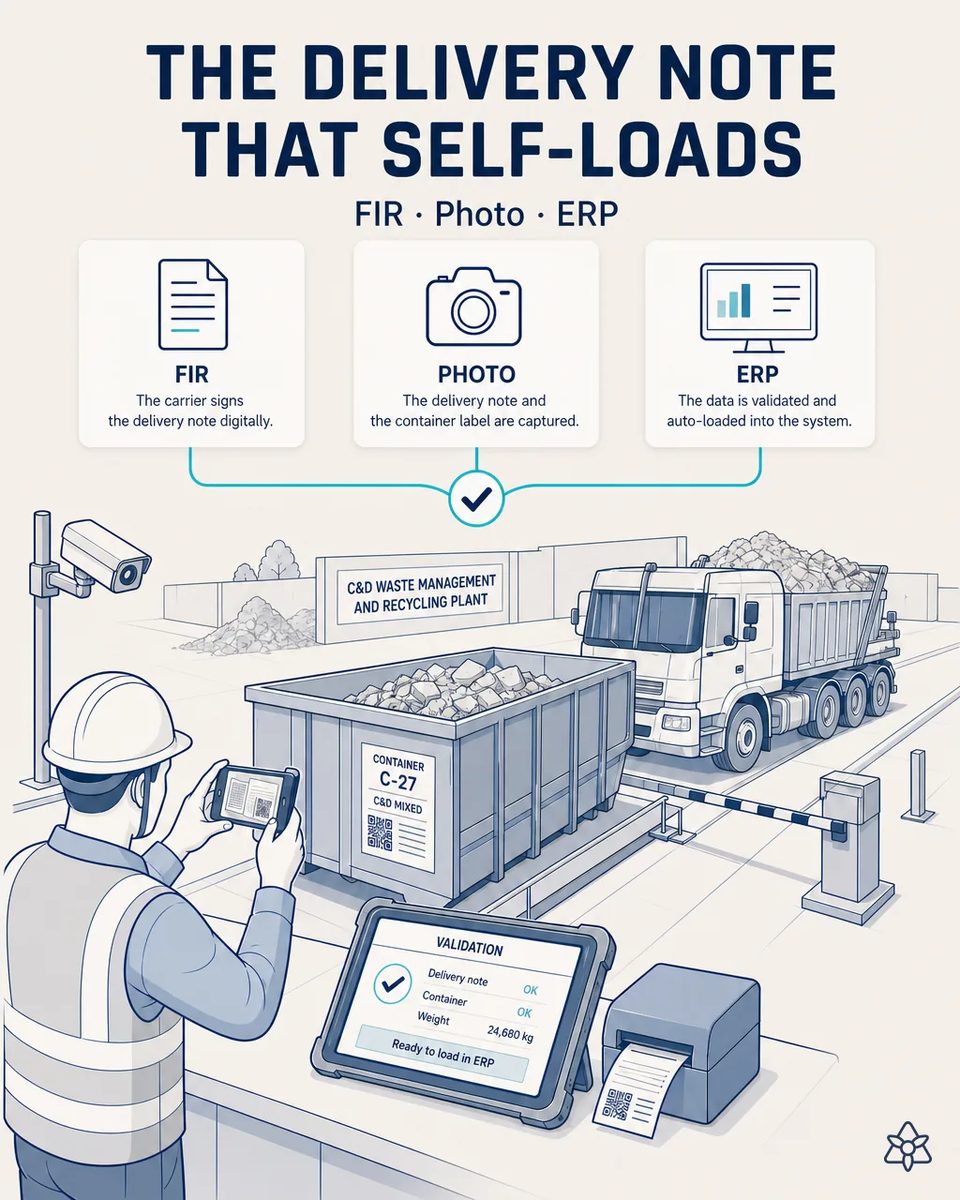
The weighbridge operator photographs the carrier's delivery note and the waste identification form instead of typing them in. With iLEAN Connect, both documents are digitized and uploaded to the ERP after one validation tap, freeing up licenses.
The queue at the scale is made of typing.
The truck waits in queue while the operator types every line of the delivery note and waste form into the system. Going fast means wrong waste codes or origins slip in, surfacing weeks later in an inspection nobody can trace precisely.
- Every truck brings a carrier's delivery note and a waste identification form, and the operator types every line — waste code, origin, weight, source site — while the next trucks wait.
- Each carrier uses its own layout, so there is no shortcut: it is read line by line and retyped by hand, truck after truck, with drivers waiting at the barrier and the next load already in line.
- To keep the queue moving the operator goes fast, and a wrong waste code or a wrong source site slips in without anyone noticing, because nobody has time to read back what was typed.
- The error surfaces weeks later, in an environmental inspection, where nobody can trace exactly which truck it came from. By then the load is aggregate, and the paper is in a box.
Connect in analog-photo mode — no carrier is asked to change its paperwork.
Connect's analog-photo mode: computer vision recognizes the delivery note and waste-form layout (no need for the carrier to change theirs), extracting tabular structure (waste code, origin, weight, source site). Validation with one tap on the scale's industrial tablet.
Vision recognizes each carrier's layout as it is and pulls out the table: waste code, origin, weight and source site. The operator confirms with one tap on the scale's industrial tablet, and the photo stays attached to the case file as proof. If an inspector asks what arrived, the answer is the document itself, not a line retyped from it.
The delivery note typed versus the delivery note photographed
| Aspect | Today | With iLEAN Connect |
|---|---|---|
| Time per truck at the booth | Minutes of typing | Seconds |
| Carrier note layouts | Retyped one by one | Read as they come |
| Waste code or origin error | Hidden until inspection | Caught at the tap |
| Proof of what arrived | The typed line | Photo plus record, by case file |
| Intake-module licenses | Several active seats | Only the validating supervisor |
| Trucks waiting | A queue at the barrier | Moving |
Minutes of queue per truck typing → seconds. Hidden waste-code or origin errors → full traceability by photo and case file.
Impact estimate — to be validated with your queue and license figures.
The block below is an estimate to be validated against your plant's actual data. We put it forward so the committee has an order of magnitude; we refine it during the assessment.
- Estimated payback 3-8 months, depending on daily trucks and on how many seats the intake module carries today.
- CFO angle: typically a 50-70% cut in intake and scale-module ERP licenses, because only the supervisor validates with a tap.
- Minutes of queue per truck become seconds, which carriers notice before anyone else does.
- And hidden waste-code or origin errors give way to full traceability by photo and case file, which is what the inspection actually asks for.
CFO angle — direct ERP license savings: the intake/scale module typically requires several active licenses; with Connect only the supervisor validates with a tap. Typically a 50-70% cut in intake/scale-module licenses. Estimated payback 3-8 months. *Estimate to validate*.
And the fair question from the production manager
“Every carrier's note is different — will it cope?” — locating and reading the table on a commercial document is an anchored task, where the best models drop below 1.5% error [1], and a new layout only has to be seen a few times. The waste code is checked against the official waste list and your authorization, and the operator's tap is still the gate before anything reaches the ERP. The photo stays with the record, so any doubt can be checked against the original.
[1] OpenAI paper "Why Language Models Hallucinate", 2025 — on the reliability of AI in anchored tasks.
What people ask about the self-loading delivery note
Does it read both the delivery note and the waste identification form?
Yes, in the same photo session. Both are linked to the truck and cross-checked against each other: same site, same code, same weight. Each photo stays linked to the record it produced.
What if the note and the form disagree?
The discrepancy is shown on the tablet before the tap. The operator decides, and the decision is stored with the truck. It is far cheaper to resolve with the driver still at the window.
Do we still need to keep the paper original?
Whatever your authorization requires stays as it is. The photo is the working copy and the proof attached to the case file. The original is filed as before, only nobody has to retype it.
Does it read container labels and QR codes?
Yes, when they are in frame. A container ID helps link the load to the source site without anyone typing it. It also shortens the search when a contractor asks about a specific container.
How many licenses does the intake module keep?
Typically 50-70% fewer, to be checked against your own seat count: the supervisor who validates keeps a seat, and the people who only typed stop needing one. The exact figure depends on how many people type intake data today.
More cases from this series
- Site or carrier alert in secondsA contractor's WhatsApp message or a carrier's email warning of a critical change reaches one person who…
- Foreman's hands-free headsetThe plant supervisor spends the whole day walking between sorting, mobile plants and the landfill with…
- Photo of the weighbridge intake formEvery truck entering a C&D waste plant carries a hand-filled waste identification form. That paper…
- The aggregate quality Excel flies to ERPThe quality manager fills in a spreadsheet every batch with grading, contaminant and moisture data for…
- Validate in two taps at the scaleNothing iLEAN captures enters the central system before a human has seen it. In the scale booth, a…
- Weighbridge stitched to ERP, no typingThe weighbridge software already exports data but stays isolated from the ERP. With iLEAN, it gets…
Tell us how long a truck waits at your scale while its paperwork is typed.
We work on your plant's real data, not ours. Assessment with no commitment.
Request estimated ROI within 48h ‹ See all cases of C&D waste recycling See waste and recycling