A paint robot without islands — the program from the ERP, real life to the CMMS
In a chassis paint booth the paint robot is relatively modern — 5 to 15 years old — and has an open fieldbus: Profinet, EtherNet/IP, OPC-UA. But it is isolated from the ERP and the CMMS: someone types the program into the TP by hand and the robot's hours live in the superintendent's Excel. With iLEAN Connect the robot is stitched bidirectionally: the correct program from the work order, live counters to the CMMS.
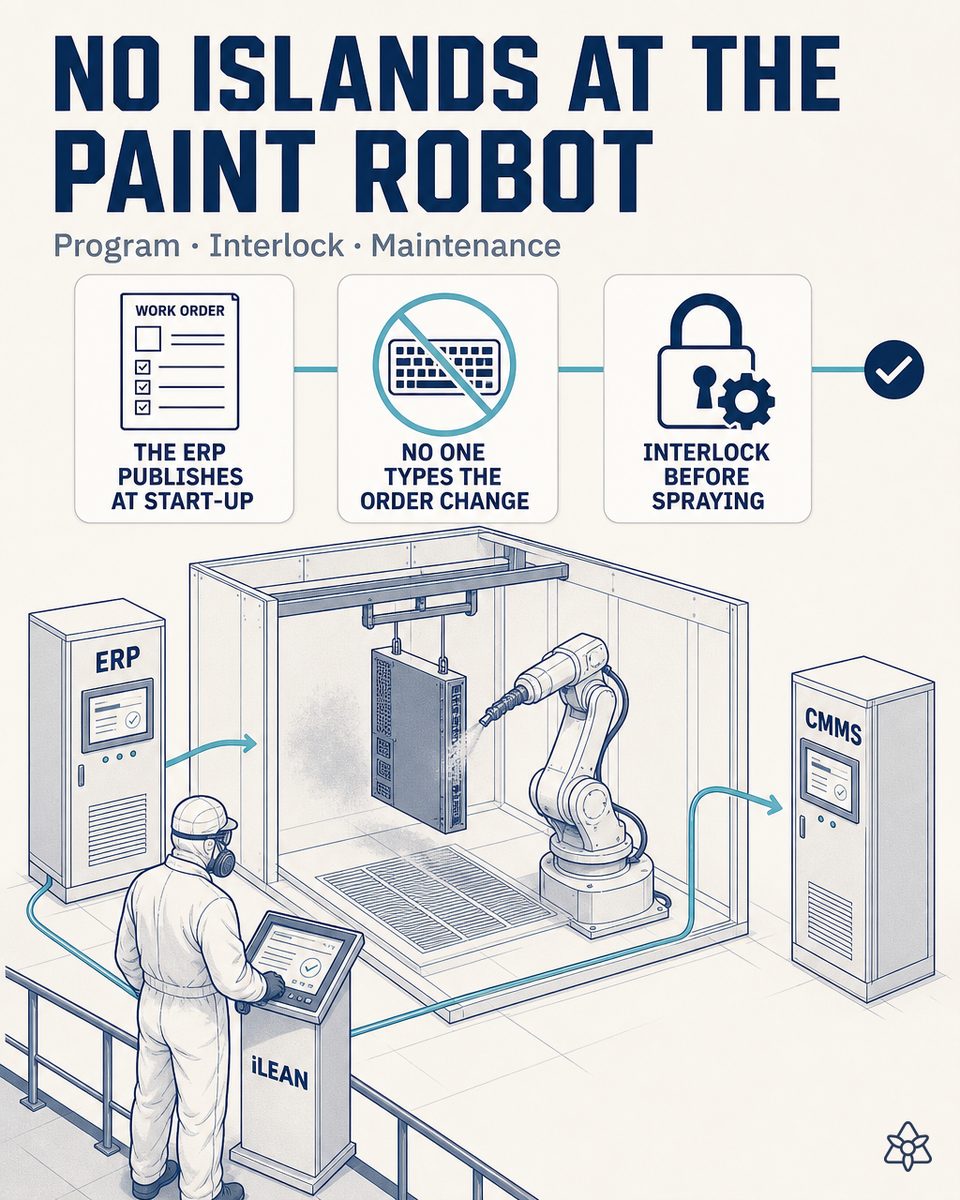
The robot has an open fieldbus — but the program is typed into the TP and its life lives in an Excel.
In an EMS plant's metal chassis paint booth, the paint robot is not the problem: it is usually 5 to 15 years old and exposes an open fieldbus — Profinet, EtherNet/IP, OPC-UA. The problem is that it is isolated from the ERP and the CMMS: the data that already exists in the systems is rewritten by hand into the TP, and the data that already exists in the controller reaches no system.
- Manual typing into the TP at every work order change — when the order changes, someone selects the program on the teach pendant by hand. Typical result: 1-3 program errors a month, with chassis batches painted with the previous program and rework or direct scrap. Estimate to be validated with your plant's data, but that is the order of magnitude.
- The robot's life lives in an Excel — the hours, shots per color, paint consumption and alarms exist in the controller, but only there: what reaches maintenance is the superintendent's partial transcription. The preventive plan runs by calendar, not by the equipment's real life.
- CAPEX is defended with impressions — when it is time to ask corporate for the spare robot or the major overhaul, there is no objective MTBF or MTTR series backing it: there are estimates, and estimates lose against any other line item with data.
The ERP knows which reference and which color are due; the robot's controller knows how many hours and shots it carries. But neither tells the other: someone has to translate by hand, with the work order waiting and the rework risk on the table.
Connect stitches the robot's bus to the ERP and the CMMS via API — the order change stops being typing and the robot's life stops being an Excel.
The work order change needs no more screens or transcriptions: the data that already lives in the ERP needs to reach the robot at the exact moment, and the data that already lives in the controller needs to reach the CMMS without anyone copying it. That is what Connect is for.
When the ERP marks the work order's startup, it automatically publishes the program and the recipe to the robot. Simultaneously, the controller's counters — shots, hours, per-color consumption, alarms — are deposited live in the CMMS.
How Connect operates in an EMS plant's chassis paint booth:
- Connect stitches modern systems via open bus and API — it connects to the robot's controller by Profinet, EtherNet/IP or OPC-UA, and to the ERP and the CMMS by REST API or webhook, replacing no equipment and touching none of the booth's safety logic.
- The ERP publishes on order startup — the program number, the recipe and the color reach the robot the instant the ERP marks the startup, in a single transaction.
- The order change stops being typing — it becomes an ERP event: when the order starts, Connect publishes the program; nobody navigates TP menus again.
- An order ↔ robot interlock before painting — the controller confirms back which program it loaded and Connect compares it against the order; if a single field differs, it holds the startup and notifies the person with the exact field that does not match.
- The counters travel to the CMMS continuously — effective hours, shots, per-color paint consumption and alarms are deposited with timestamps; the preventive plan goes from calendar to real predictive on hours and shots.
- MTBF and MTTR calculated automatically — every alarm opens an event in the CMMS and every closure documents it: the robot's reliability series builds itself, ready for the auditor and the CAPEX committee.
A program typed into the TP vs. a program published from the work order
| Aspect | Program typed into the TP | Program published from the order |
|---|---|---|
| The robot's program at every order change | Typed by hand into the TP | Published automatically from the ERP's order |
| Program errors from typing | 1-3 a month, with rework or direct scrap | Zero human-origin errors in program loading |
| The robot's life: hours, shots, per-color consumption | The superintendent's Excel, a partial transcription | A CMMS with live controller data |
| The robot's preventive plan | By calendar, blind to real use | Real predictive on hours and shots |
| The robot's MTBF and MTTR | Estimated by hand, if anyone calculates them | Calculated automatically on real events |
| Defending the spare CAPEX before corporate | Impressions and estimates | An objective, auditable reliability series |
Impact estimate for your plant — to be validated with your own numbers.
The block below is an estimate to be validated against your plant's actual data. We put it forward so the committee has an order of magnitude; we refine it during the assessment.
- EMS plant with a metal chassis paint booth and a 5-to-15-year-old paint robot with an open fieldbus — Profinet, EtherNet/IP or OPC-UA —, several order changes per shift and several colors per week.
- Connect pilot on the order change and the robot's counters — it stitches the robot's bus to the ERP and the CMMS via API, replacing no equipment and touching none of the booth's safety logic. First value expected within a few weeks.
- Fast payback estimated between 3 and 6 months from the reduction of rework and scrap tied to program errors, depending on the frequency of order changes and the cost of the repainted chassis. Estimate to be validated.
- An additional lever: the quantitative defense of the robot's spare CAPEX before corporate — MTBF and MTTR calculated on real data turn the request for the major overhaul or the replacement robot into an objective series, not the superintendent's impression. Estimate to be validated.
And the fair question from the maintenance manager
"What if the AI invents a program or some robot hours?" — it cannot: in this case the AI does not generate data, it transports it anchored. The program number, the recipe and the color come straight from the ERP's order, and the hours, shots and alarms come straight from the robot's controller; hallucination is a problem of free generation, not of anchored tasks, where the best models brought the error below 1.5% [1]. And even then, nothing critical is decided alone: Connect reads back which program the controller confirms having loaded, compares it against the order and holds the startup if anything differs, notifying the person before the first chassis is painted. The safety rings are there precisely for this.
[1] OpenAI paper "Why Language Models Hallucinate", 2025 — on the reliability of AI in anchored tasks.
What people ask about stitching the paint robot to the ERP and the CMMS
Which protocols does the robot-ERP-CMMS integration support?
Connect connects to the robot's controller through the open fieldbus the equipment already exposes — Profinet, EtherNet/IP or OPC-UA —, the usual case in paint robots 5 to 15 years old. On the ERP and CMMS side, Connect integrates by REST API or webhook over the production events — order startup, color change, batch end — touching neither the booth's safety logic nor any system's database. There are no intermediate files or manual exports: when the ERP marks the order's startup, the program and the recipe are published to the robot in a single transaction, and the controller's counters return by the same channel, event by event.
What happens if the robot loses connection in the middle of a work order?
The booth does not stop: the robot keeps painting with the program it already has loaded and confirmed, because the package was published complete at the order's startup. What Connect does is hold the next change: if on closing the order or starting the next one the connection is unavailable, it does not let a half-loaded program start and notifies the line manager with a short phrase. The counters are not lost: they stay in the connector's local buffer and reconcile with the CMMS when the connection returns, with no gaps in the hours or the shots. As an emergency exit the usual manual mode exists — typing into the TP as today — but against the order's validated data, not from memory. Connect adds no single point of failure: it steps aside without blocking the line.
How does the correct program reach the robot from the work order?
The order in the ERP carries the chassis reference, the color and the program or recipe number corresponding to it on the robot. When the ERP marks the startup, Connect publishes that package to the controller over the bus — Profinet, EtherNet/IP or OPC-UA — and the robot loads the program without anyone navigating the TP. Then, the controller confirms back which program it loaded and with which parameters, and Connect compares it against the order before accepting the startup: if a single field differs, it holds the startup and notifies the person indicating the exact field that does not match. It is a data interlock, not a machine one: nobody loses control of the robot, but no chassis gets painted with a program the order does not back.
How are the robot's real MTBF and MTTR calculated?
On controller data, not estimates. Connect continuously reads the robot's effective operating hours, shots and alarms, each with its timestamp, and deposits them in the CMMS. Every failure alarm opens an event; the intervention's closure closes it. With that series, the CMMS calculates MTBF on the real operating time between failures — not on the calendar — and MTTR on each intervention's real duration. Nobody transcribes anything into an Excel: the series is continuous, objective and auditable. And that same series is what allows defending the robot's spare CAPEX before corporate with numbers instead of impressions.
Does this replace the booth operator or free them?
It does not replace them: it takes away the typing of the program into the TP at every order change and the transcription of hours and consumptions into the Excel, the mechanical, error-prone part of the job — and the one that can end in a chassis batch painted with the previous program, with rework or direct scrap. The order change goes from navigating TP menus to an event that already exists in the ERP. The recovered time returns to what does require human judgment: inspecting the first painted piece, controlling the application and the fan pattern, fine-tuning the process and supervising the booth itself.
More cases from this series
- A customer audit evidence pack — the OEM scorecard in continuous greenEvery change generates a dossier with photos, log and signatures. Agents organizes it by standard (ISO…
- Early human verification — two taps and the ERP stays cleanNothing iLEAN captures enters the ERP without a human signature on the tablet. Two taps, seconds, the…
- The curing oven now talks — without touching the original SCADAAn external camera reads the tunnel oven’s SCADA panel without touching the machine. A per-batch thermal…
- OEM customer spec change — zero rework from reading lateiLEAN silently copied on the mailbox. When the OEM changes a paint spec, the notice reaches the…
- From the laboratory’s Excel to the ERP at second zeroiLEAN reads the laboratory’s Excel as soon as it is saved, validates and feeds the ERP. Fewer quality…
- Paint receiving into the ERP — no typing, with shielded traceabilityA photo of the delivery note, the CoA and the GS1 labels. One tap and all into the ERP. Truck from 45 to…
Turn your paint robot into data — ask us for the integration study. Tell us your case and we will send within 48h the estimated ROI for your plant.
We work on your plant's real data, not ours. Assessment with no commitment.
Request estimated ROI within 48h ‹ See all 12 chassis paint cases See electronics