Two taps before anything enters the ERP
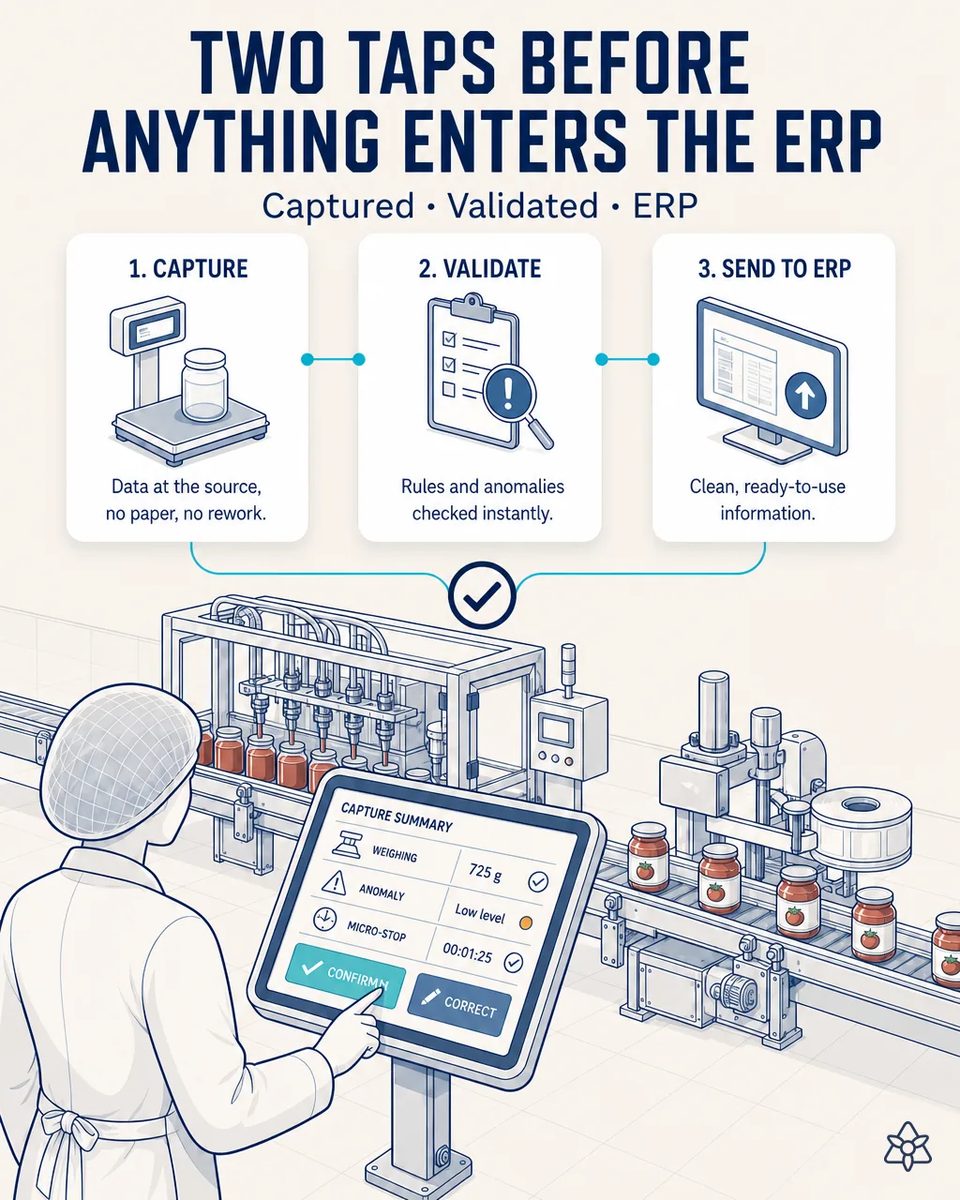
Nothing iLEAN captures enters the ERP until a person has seen it. In a sauce and canned food plant that means a tablet at the line showing each capture as a two-second summary; the operator confirms or corrects with two taps and only then does the data cross into the ERP.
Between fear of a polluted ERP and fear of more typing, the data stays on paper.
The main cultural barrier to digitizing the plant is the fear that an AI will write unsigned data and pollute the ERP master data, especially while a new ERP is being rolled out. At the same time, operators do not want to type more or learn complex screens. Caught between those two fears, most shop-floor data never gets captured.
- The first cultural barrier is the fear that an AI will write unsigned data into the ERP master, especially while a new ERP is being rolled out.
- On the other side, operators who already juggle bins, kettles and fillers do not want to type more or learn complex screens.
- Caught between those two fears, most shop-floor data is never captured: hopper loads, field truck tickets and micro-stops stay on paper.
- And what does get typed in a hurry at the end of a season shift reaches the ERP without anyone checking it.
Connect with early human verification — confirm or correct, without leaving the station.
iLEAN Connect in early human verification mode.
Whatever the source, a photo at the hopper, a dictated micro-stop, a grower email or a lab file, the operator sees the same short summary and taps confirm or correct. Only then does the data cross into the ERP, with signature and timestamp. That rule is what gets the other eleven cases approved. It also gives quality what it asks for first: a name behind every value in the ERP.
- Every capture (photo, voice, email, file) produces a visual summary.
- The summary appears on the station tablet.
- The operator confirms or corrects with two taps.
- Validated data crosses into the ERP via API with signature and timestamp.
- Corrections are used to improve capture.
Unsigned data versus data confirmed at the station
| Aspect | Today | With iLEAN Connect |
|---|---|---|
| Hand behind each ERP entry | An unknown hand, or no one | The operator who confirmed |
| Seconds spent per capture | Minutes of typing | Two seconds, two taps |
| A misread kilo on a scale ticket | Reaches the master | Corrected at the tablet |
| Capture channels at the station | Each with its own screen | Photo, voice, email and file, one format |
| ERP master during the rollout | At risk | Clean |
| What happens to corrections | Lost | Used to improve capture |
Before: data not captured out of distrust, or unvalidated data in the ERP. After: data captured and validated in seconds, clean ERP master data.
Impact estimate — no months on this one, and here is why.
The block below is an estimate to be validated against your plant's actual data. We put it forward so the committee has an order of magnitude; we refine it during the assessment.
- No standalone payback: this is an enabling piece. Its value is strategic and we do not price it separately.
- It is the condition for the other cases to be approved: no quality lead signs off AI writing into the ERP without a person in between.
- Data moves from not captured out of distrust, or unchecked in the ERP, to captured and validated in seconds.
- And ERP master data stays clean while the new system is still settling in.
Enabling strategic value, not priced separately: it is the condition for the other use cases to be approved. Estimate to be validated.
And the fair question from the production manager
"If someone has to confirm everything, where is the saving?" — in the typing, which is where the hours and the errors were. Reading a summary is not transcribing it. The extraction behind each summary is an anchored task where the best models stay under 1.5% error [1], so the operator acts as a safety net, not as a second data-entry clerk. And correcting a field takes the same two taps as confirming it.
[1] OpenAI paper "Why Language Models Hallucinate", 2025 — on the reliability of AI in anchored tasks.
What people ask about confirming captures at the station
Can a capture ever skip the tablet during the rush of the season?
No. The flow is built so that nothing crosses into the ERP without a tap, and there is no switch to bypass it. Even at the peak of the tomato harvest, that rule does not change. If a shift is short-staffed, captures wait in a queue rather than going in unchecked.
What does the operator actually see on the screen?
A two-second summary: what was captured, the key values and the order it belongs to, with confirm and correct buttons. The format is the same whether the source was a photo, a dictation or a file. Fields the model read with low confidence are highlighted, so attention goes where it is needed.
Does it help while a new ERP is being rolled out?
It is when it matters most. Validated data goes in via API with signature and timestamp, so the new master starts clean instead of inheriting the errors of the old paper flow. That gives the ERP project team one less worry during cutover, because the data arriving from the floor is already checked.
Can the tablet be used with wet gloves near the filler?
Yes, with an industrial tablet in a washdown-rated enclosure, mounted on a pedestal where the operator already stands. The buttons are large enough for gloved hands. One tablet per line is the usual starting point, near the filler or the hopper depending on the case.
Who sees the corrections, and for what?
They are stored with the original capture and the name of whoever corrected it. That shows where the capture reads badly, for example a new grower's scale ticket layout, and it is used to improve the next reading. Over the season, the share of corrections falls, and quality can watch it fall.
More cases from this series
- Food safety audit ready, nothing to rebuildEvery cleaning, thermal cycle and release produces its evidence; iLEAN Agents organizes it by standard…
- True packaging OEE, no hidden stoppagesConnect, Edge and Agents working together to measure true OEE, anticipate stoppages and connect the…
- Case and pallet labels, always matchingLot, best-before date and codes travel from the ERP to the case labeler and palletizer; iLEAN…
- Field alerts arrive before the problem doesiLEAN reads grower and carrier alerts from WhatsApp or email, matches them with the production plan and…
- From the lab spreadsheet to the ERP, no retypingiLEAN reads the quality lab spreadsheet, has the lead validate it and posts it to the ERP. Fewer…
- Paperless order start at the hopperA photo of the bin label and weighing ticket puts the real consumption of each production order into the…
See in a demo how a hopper capture is confirmed in two seconds.
We work on your plant's real data, not ours. Assessment with no commitment.
Request estimated ROI within 48h ‹ See all cases of sauces and canned vegetables See food industry