Line startup in a dairy processing plant — the order and the shift checklist live on paper until someone keys them in.
In a dairy processing plant cutting and packing cheese, the Production Order and the shift's startup checklist live on paper until someone keys them in hours later. With iLEAN Connect in photo mode, the line manager takes two photos with their phone and the batch exists in the central system at second zero, with no habit change.
Line startup is where second zero is lost, not at cutting or packing.
In a dairy processing plant that cuts, forms and packs cheese — any multi-format processing plant with lines dedicated to different retail customers — the running process is stable: once started, the line cuts and packs batch after batch with little incident. The problem is each shift's startup, repeating on every line and resting on two papers at once:
- The printed work order — SKU, format, retail customer, PDO/non-PDO denomination and allergens. It comes out of the office and piles up in the shift manager's office with the day's other orders.
- The startup checklist — hand-signed by the line manager: cleaning, calibration, verification of the previous product. It lives on paper until someone transcribes it.
Between the real startup and both papers' digitization, 4 to 8 hours pass. In that hole is where the mismatches appear: the order carried an SKU substitution handwritten by the shift manager, and the ERP keeps showing the original SKU throughout that window. That hours-long hole is the invisible factory of recalls and nonconformities at the next IFS/BRC audit — nobody sees it until an auditor asks for the batch's file and it does not add up.
Connect in photo mode — two photos by the line manager, and the batch exists in the central system.
Line startup needs no habit change and no new screen over the packing machine. The information that already exists on paper — the office's order and the hand-signed checklist — needs to reach the central system at second zero, without anyone transcribing it hours later. That is what Connect in photo mode is for.
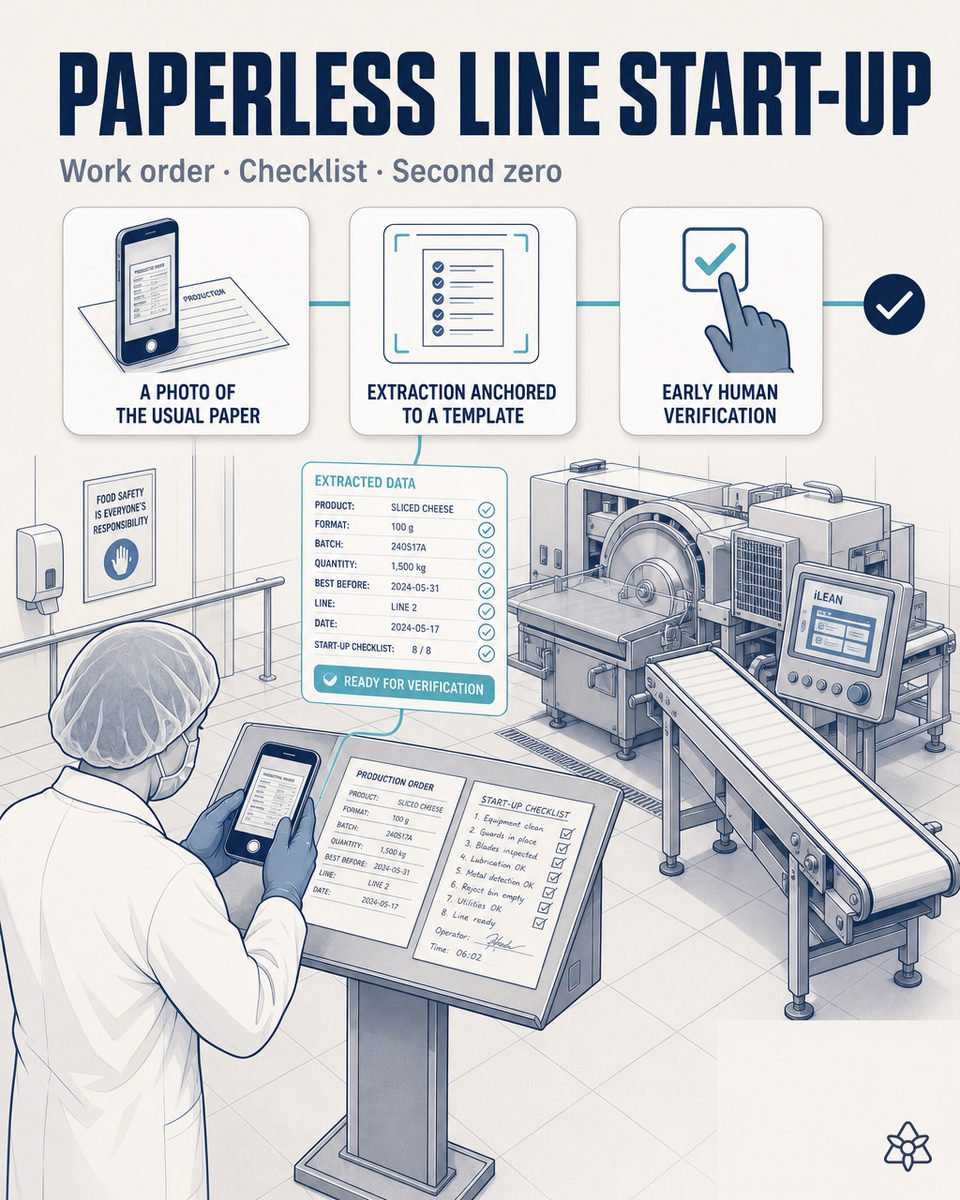
The line manager puts the order and the checklist on a surface, takes two photos with the phone and continues with their startup. Connect extracts the fields, saves them in central memory and presents the batch on the tablet for verification. Two taps and the batch enters the ERP — the line has not lost a single extra minute.
How Connect photo operates at a dairy processing plant's line startup:
- Two photos, one surface — the line manager puts the printed order and the signed startup checklist on the table or the line's panel, and takes two photos with the phone or tablet they already carry. No new app to learn and no field to type.
- Extraction anchored to the real template — a language model anchored to the house's specific order and checklist templates extracts the structured fields: SKU, format, retail customer, PDO/non-PDO denomination, allergens and every checklist item marked yes/no.
- Central memory at second zero — the extracted fields are saved in the system's central memory the very instant of the photo, not hours later when someone passes by the shift manager's office.
- Human verification on the tablet — the batch appears on the line's industrial tablet for the line manager to confirm the extracted fields. If Connect detects that the order carries a handwritten SKU substitution not matching the checklist, it warns before the second tap: "the order's SKU does not match the format validated in the checklist — confirm before starting".
- The batch in the ERP with two taps — the line manager confirms, and the batch enters the ERP with the order and the checklist already linked. The startup's file stays archived per batch, with both original photos, ready for an auditor's query without anyone reconstructing it.
Paper startup vs. startup digitized with Connect
| Aspect | Classic paper startup | With iLEAN Connect photo |
|---|---|---|
| Digitization latency | 4-8 h from the real startup | Second zero — two photos and central memory |
| A handwritten SKU substitution | The ERP keeps the original SKU for hours | Extracted from the order and contrasted when verifying the photo |
| The startup checklist | Signed paper, piled up in the shift office | Digitized and linked to the batch in the moment |
| An auditor's query on a batch | Scattered papers, the office must be tracked down | A per-batch web query, with the original photos |
| A real-order vs. ERP discrepancy | Detected at the retailer or the next audit | Detected at startup, before packing |
| The data's verification | Nobody signs the digitization, no traceability of who validated | The line manager confirms on the tablet with two taps — their signature remains |
Impact estimate for your plant — to be validated with your own numbers.
The block below is an estimate to be validated against your plant's actual data. We put it forward so the committee has an order of magnitude; we refine it during the assessment.
- Dairy processing plant cutting and packing cheese: several lines dedicated to different retail customers, with a shift startup on each one.
- Connect photo pilot on line startup — only the line manager's phone, no construction work or new screen. First value expected within a few weeks.
- Indicative payback between 4 and 9 months, depending on the plant's number of lines and batches/day. Estimate to be validated.
- Expected reduction of order/ERP discrepancies detected late ≥30% in the first months, from the automatic cross-check at second zero. Estimate to be validated with your data.
- The hard lever is a discrepancy detected at startup, before packing: it avoids reworking a complete batch or a recall for a wrong label or SKU.
And the fair question from the plant manager
"What if the model misinterprets the checklist or confuses a yes with a no?" — hallucination is a problem of free generation, not of anchored tasks. In tasks where the AI limits itself to recontextualizing a specific data point from one medium to another (reading the printed order and checklist and extracting their fields), the best models brought the error below 1.5% [1]. And even then, nothing critical is decided alone: Connect holds the batch and the person signs on the tablet with two taps. The three safety rings are there precisely for this.
[1] OpenAI paper "Why Language Models Hallucinate", 2025 — on the reliability of AI in anchored tasks.
What people ask about line startup in a dairy processing plant
Why does line startup fail today in a dairy processing plant?
Because each line starts each shift with two simultaneous papers: the printed work order (SKU, format, retail customer, PDO/non-PDO denomination and allergens) and the hand-signed startup checklist. Both pile up in the shift manager's office and take between 4 and 8 hours to be digitized. In that hole is where the classic mismatch appears: an SKU substitution handwritten on the order that the ERP does not reflect until hours later.
Is new hardware needed to use Connect in photo mode?
No. Connect in photo mode works with the phone the line manager already carries. They put the order and the checklist on a surface, take two photos and continue with their startup. The later verification is done on the industrial tablet already existing at the line or, if there is none, on the same phone. No wiring the packing machine and no replacing the label printer or the scale system you already have.
Does the line manager have to learn anything complicated?
There is no real learning curve. The gesture is two photos and two taps: photographing the order and the checklist, and confirming on the tablet the fields Connect extracted before the batch enters the ERP. No menus, no fields to type, no forms to fill. If something does not add up — like the hand-substituted SKU example —, Connect warns with a short phrase before the second tap, and the line manager decides.
What about old lines with no screen?
Connect in photo mode does not depend on the line, it depends on the paper and the phone. In dairy processing plants with cutting and packing lines without a touchscreen or a modern industrial protocol, the line manager keeps starting the same way: a printed order, a paper checklist, two photos. No PLC touched, no integration stoppage. If a fixed industrial tablet is later added at the line, verification happens there; if not, on the same phone.
How is it validated that the data entering the ERP is correct?
The language model extracting the fields is anchored to the house's real template of order and checklist — it generates no free data, it recontextualizes what is already printed or handwritten. Before the batch enters the ERP, the line manager verifies it on the tablet with two taps: they confirm SKU, format, customer, denomination, allergens and every checklist item. The batch does not enter the system alone — the person signs the verification, and that signature stays archived with both original photos for an IFS/BRC auditor's query.
More cases from this series
- The audit always ready — zero manual reconstruction in the processed cheese plant.Every critical changeover and every cold chain event generates an auditable dossier ready by standard.…
- Three machines stitched to the ERP — one tap changes the SKU on all threeiLEAN stitches the coder, the dynamic checkweigher and the slicer to the ERP via API. An SKU change in…
- From the laboratory’s Excel to the ERP, without transcribing — and with license savingsiLEAN Connect reads the laboratory’s Excel, validates on screen and feeds the ERP. Typical saving of -50…
- Nothing enters the system without a human having seen it — the tablet at the line asks for a two-tap signature before the data crosses into the ERP.An industrial tablet at the line. iLEAN shows a visual summary, the operator signs with two taps and…
- Receiving stops blocking the manager for an hour — the truck waits while the delivery note and the GS1-128 labels are typed by hand into the ERP.iLEAN Connect digitizes the delivery note and GS1-128 labels at cheese base receiving. Fewer carrier…
- A retailer order change in a dairy processing plant — the planner’s inbox is where the waste is lost.iLEAN Connect reads the retailer’s email and WhatsApp 24/7, crosses them with active orders and suggests…
Tell us your case and we will send within 48h the estimated ROI of this AI project for your dairy processing plant's photo-based line startup.
We work on your plant's real data, not ours. Assessment with no commitment.
Request estimated ROI within 48h ‹ See all 12 processed cheese cases See food industry