From the laboratory’s Excel to the ERP, without transcribing — and with license savings
In a dairy processing plant the lab fills in every shift an Excel with moisture, fat/dry extract, pH, texture and cross-contamination checks. iLEAN Connect reads it, validates it on screen and pushes it to the ERP via API. Typical CFO saving: -50 to -80% in quality-module ERP licenses.
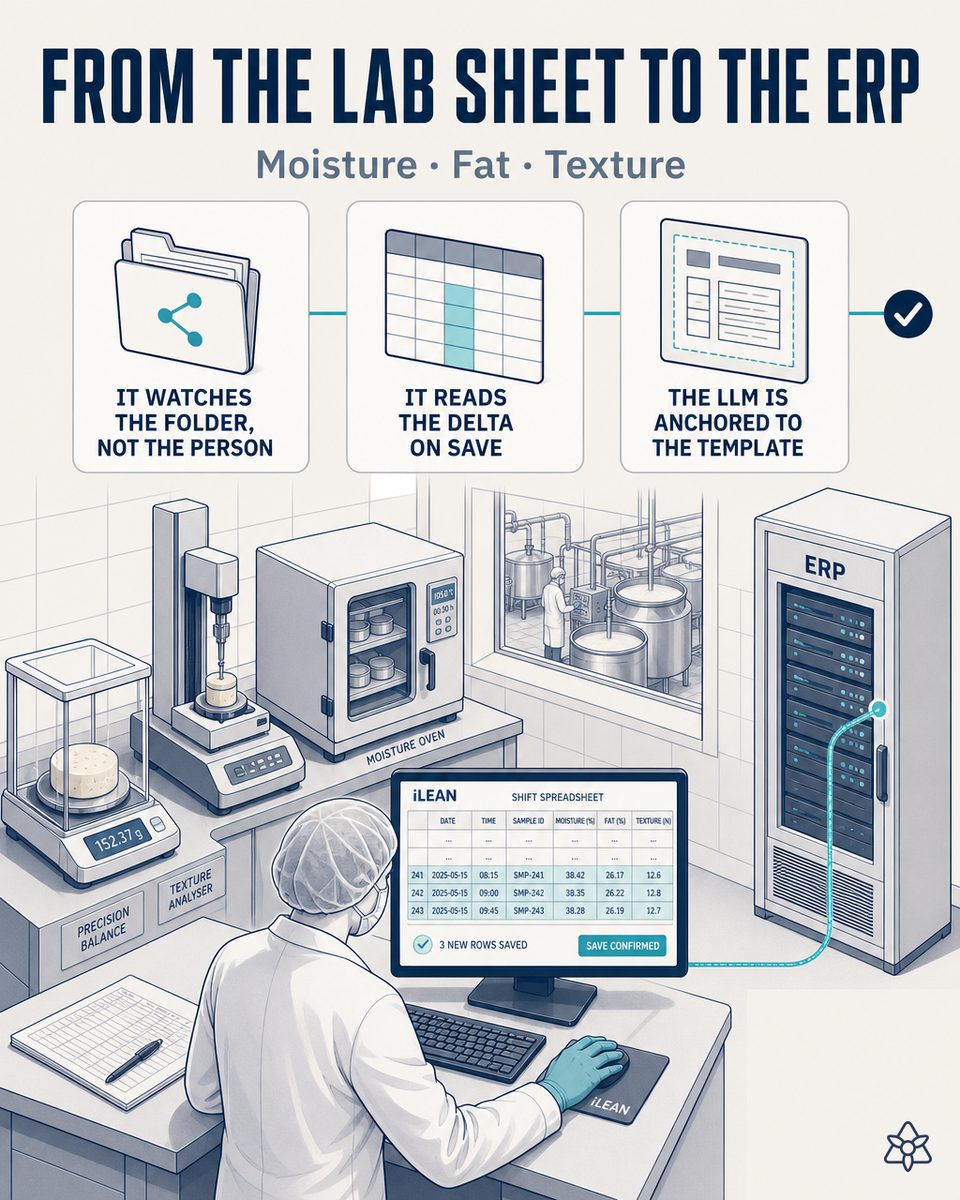
Two parallel worlds: the lab's real Excel and the plant's official ERP.
In a dairy processing plant, the quality lab keeps its own Excel: moisture, fat/dry extract, pH, texture and each shift's cross-contamination checks. It is the data the lab actually works with, updated to the minute. The official ERP, instead, receives those same data typed by hand by someone copying from the Excel into the quality module's form — when they have a moment.
- Two parallel worlds — the lab's real Excel and the plant's official ERP, with a typical lag of 15 to 30 days between the data existing and the data being in the corporate system.
- IFS/BRC audits with gaps — when the auditor asks to cross a quality parameter with its corresponding batch, that cross-check should come out of the ERP in seconds; in practice, someone has to dig it out of the original Excel, because the ERP does not have it yet or has it late.
The cost is not only traceability: it is licenses. For that typing to be possible, several lab people need a quality-module license of the ERP — not because they use it to manage quality, but because it is the only way to get their own data into the system.
Connect listens inward: it watches the folder, not the people.
The lab's Excel does not need to disappear or change format. The data that already exists in that sheet needs to reach the ERP without anyone retyping it, and without waiting 15-30 days for the corporate system to reflect the plant's reality. That is what Connect is for.
Connect watches the shared folder where the lab saves its Excel — it does not watch the analyst filling it in. When the file is saved, it reads the delta, validates it on screen and pushes it to the ERP via API. The lab keeps working exactly as always.
How Connect operates on a dairy processing plant's quality Excel:
- Connect watches the folder, not the human — it points at the network location where the lab saves each shift's Excel. It does not intervene while it is being filled, it times nobody: it only detects when the file has been saved.
- It reads the delta on save — as soon as the Excel is saved, Connect identifies which rows are new since the last push and extracts them, without reprocessing the whole history every time.
- An LLM anchored to the real template — the model generates no free data: it recontextualizes exactly what is in the cell, column by column, against the lab's real template, including its own columns and its usual order.
- Human validation on a tablet — before anything reaches the ERP, the designated person reviews the delta on a simple screen: they confirm or correct. The data does not enter alone.
- Push to the ERP via API — once validated, Connect writes the record directly into the ERP's quality module, without anyone having to open the ERP to type it by hand.
Excel and ERP disconnected vs. Excel and ERP with Connect in between
| Aspect | Excel and ERP disconnected | With Connect in between |
|---|---|---|
| Excel-ERP lag | 15-30 days | Second zero, same shift |
| Manual transcription | Half a day per month per person | Zero — automatic push via API |
| IFS/BRC audit: parameter-batch cross-check | Rebuilt by hand in the original Excel | Automatic batch-by-batch cross-check, already in the ERP |
| Quality-module ERP licenses | 5 people licensed just to transcribe | 1 license — the validator's |
| Data validation before the ERP | None — it is typed and that is it | Human validation on screen before the push |
| Transcription error risk | Present in every manual copy | Removed — template-anchored LLM + human validation |
Impact estimate for your plant — to be validated with your own numbers.
The block below is an estimate to be validated against your plant's actual data. We put it forward so the committee has an order of magnitude; we refine it during the assessment.
- Dairy processing plant with its own quality lab and a corporate ERP, typically SAP-tier or equivalent, with the quality module licensed per user.
- If today 5 lab people hold a quality-module license just to enter their own data, with Connect the license of the person who validates is enough — usually a single person.
- Expected reduction of -50% to -80% in quality-module licenses, with a recurring annual saving in the order of tens of thousands of euros on SAP-tier ERPs, depending on vendor and contract. Estimate to be validated.
- Estimated payback between 4 and 9 months, counting the setup of Connect on the lab's folder and the tuning of the real template. Estimate to be validated with your numbers.
- The 15-30 day Excel-ERP lag drops to second zero, which also cuts the preparation time of every IFS/BRC audit — an additional saving not included in the license calculation.
And the fair question from the CFO
"What if the LLM misreads an Excel cell and the wrong data reaches the ERP?" — hallucination is a problem of free generation, not of anchored tasks. In tasks where the AI limits itself to recontextualizing a specific data point from one medium to another (reading an Excel cell and moving it to the ERP's corresponding field), the best models brought the error below 1.5% [1]. And even then, nothing critical is decided alone: Connect holds the push until the person validates on screen. The three safety rings are there precisely for this.
[1] OpenAI paper "Why Language Models Hallucinate", 2025 — on the reliability of AI in anchored tasks.
What people ask about taking the lab's Excel to the ERP with Connect
How does Connect read the lab's Excel without the team changing how they work?
Connect watches the shared folder where the lab already saves the quality Excel — it does not watch the person filling it in. When the analyst saves the file at the end of the shift, Connect detects the delta (the new rows of moisture, fat/dry extract, pH, texture and cross-contamination checks) and reads them with an LLM anchored to the lab's real template. The team keeps filling in exactly the same Excel as always, with the same columns and the same shift habit; there is no new form to learn or screen to install.
What happens if the Excel template's format changes?
If the lab adds a column, renames a parameter or reorders the tabs, Connect does not break silently: the template-anchored LLM detects the variation and, if the change is ambiguous, flags it for human validation instead of pushing a misread data point to the ERP. A template adjustment requires no new integration or a call to IT — the reading is reconfigured, not the system's plumbing.
How is the real saving in quality-module licenses calculated?
The logic is one of license consumption, not hours: if today 5 lab people hold an ERP quality-module license just to be able to type their own data, with Connect it is enough for a single person — the one validating on screen before the push — to hold that license. On SAP-tier ERPs, where the quality-module seat is usually among the most expensive, going from 5 to 1 license typically means between -50% and -80% of that module's cost, with a recurring annual saving in the order of tens of thousands of euros depending on vendor and contract. It is an estimate to be validated against your own license contract.
What human validation exists before the data enters the ERP?
No row reaches the ERP without first passing a validation screen on a tablet: the designated person sees the delta Connect has read from the Excel, compares it with the original data and confirms or corrects before the push via API fires. Connect does not write into the ERP on its own — it prepares the data and leaves it ready to sign, and the person signs. It is the same safety-rings principle we apply in any deployment: the AI anchors and proposes, the person decides.
Does it work with any ERP?
Yes. Connect pushes the validated data via API, so it does not depend on a specific ERP brand: it works the same with a SAP-tier ERP, a smaller sector ERP or a custom build, as long as it exposes an endpoint to write the batch's quality record. It neither replaces your ERP nor migrates data — it automates the stretch a person does by hand today: reading the lab's Excel and typing it into the quality module.
More cases from this series
- The audit always ready — zero manual reconstruction in the processed cheese plant.Every critical changeover and every cold chain event generates an auditable dossier ready by standard.…
- Three machines stitched to the ERP — one tap changes the SKU on all threeiLEAN stitches the coder, the dynamic checkweigher and the slicer to the ERP via API. An SKU change in…
- Nothing enters the system without a human having seen it — the tablet at the line asks for a two-tap signature before the data crosses into the ERP.An industrial tablet at the line. iLEAN shows a visual summary, the operator signs with two taps and…
- Receiving stops blocking the manager for an hour — the truck waits while the delivery note and the GS1-128 labels are typed by hand into the ERP.iLEAN Connect digitizes the delivery note and GS1-128 labels at cheese base receiving. Fewer carrier…
- Line startup in a dairy processing plant — the order and the shift checklist live on paper until someone keys them in.iLEAN Connect captures by photo the work order and the line startup checklist in a dairy processing…
- A retailer order change in a dairy processing plant — the planner’s inbox is where the waste is lost.iLEAN Connect reads the retailer’s email and WhatsApp 24/7, crosses them with active orders and suggests…
Cut the lab's ERP licenses without losing traceability — tell us your case and we will send the estimated ROI within 48h.
We work on your plant's real data, not ours. Assessment with no commitment.
Request estimated ROI within 48h ‹ See all 12 processed cheese cases See food industry