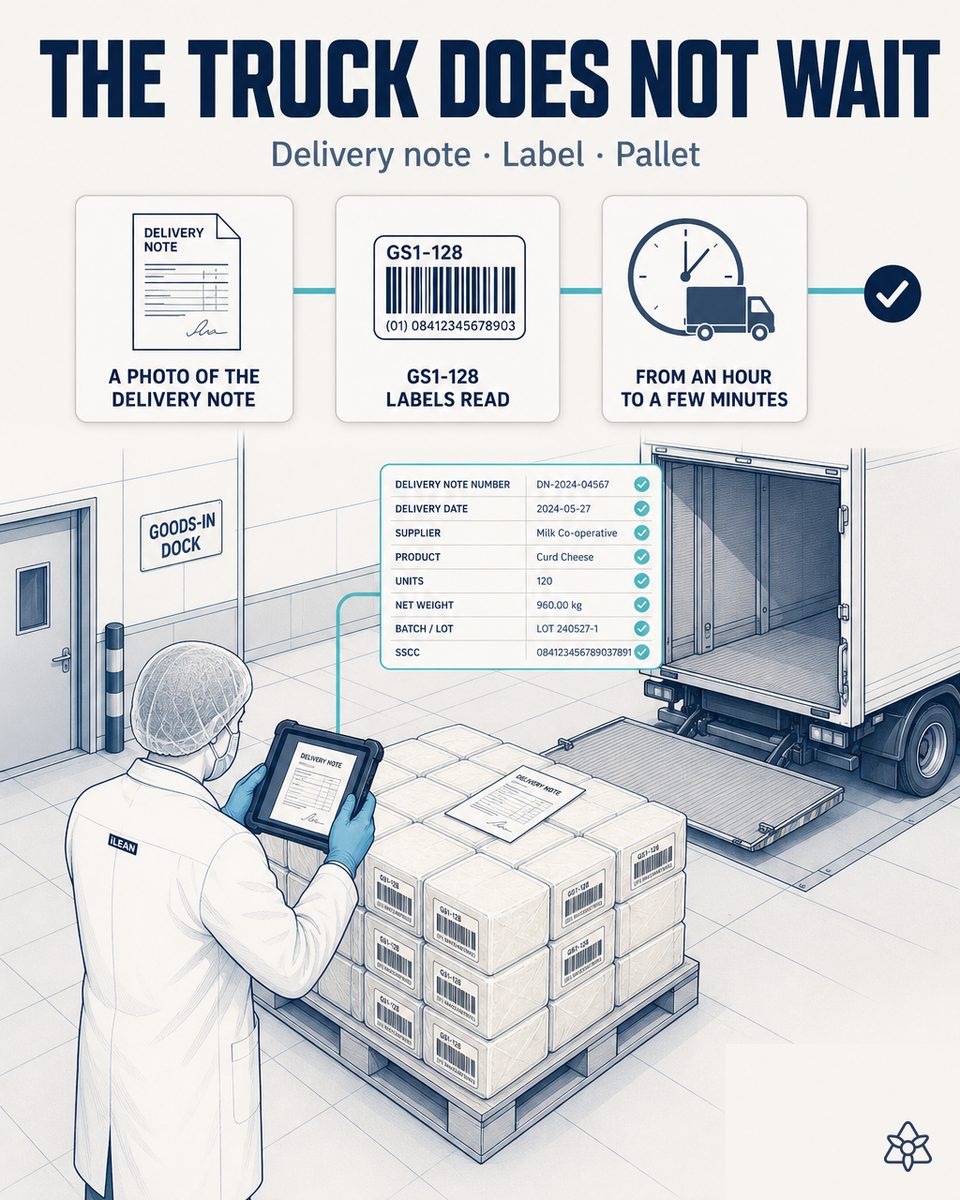
Receiving stops blocking the manager for an hour — the truck waits while the delivery note and the GS1-128 labels are typed by hand into the ERP.
The truck arrives with pallets of already-curdled cheese (from the group or integrated third parties). The receiving lead today types 12-20 lines into the ERP and the truck waits 45 min. iLEAN Connect digitizes the delivery note and GS1-128 labels in seconds and, after one tap, they go to the ERP.
Receiving is where the shift lead gets blocked, not in-line production.
In a dairy processing plant receiving already-curdled cheese — from other plants of the same group or from third parties integrated in the chain — the in-line process is stable once it starts. The problem is each truck's receiving, repeated several times a day and resting on two documents at once:
- The delivery note — A3 format, with 12-20 lines of pallet, batch, weight and designation. The receiving lead types it by hand into the ERP while the truck waits at the dock.
- Each pallet's GS1-128 labels — a barcode with batch, milk origin, production date and weight. They are cross-checked from memory against the delivery note, pallet by pallet.
Between the truck arriving and the last pallet being recorded in the ERP, up to 45 typical minutes pass, with the driver waiting and the receiving lead typing line by line. It is in that typing under pressure that the PDO/non-PDO mismatch appears: a pallet not covered by the designation gets recorded anyway because nobody had time to check it calmly. That error does not surface until weeks later, in an audit or a retailer complaint.
Connect in photo mode — the delivery note and GS1-128 labels digitized at the dock, with no typing.
Receiving needs neither a barcode reader wired to the scale nor a new station at the dock. The paper delivery note and the labels each pallet already carries need to reach the ERP at second zero, without the receiving lead typing them while the truck waits. That is what Connect in photo mode is for.
The receiving lead photographs the A3 delivery note and the pallets' GS1-128 labels with the dock tablet. Connect extracts batch, designation, milk origin, production date and weight, and crosses them with the expected order. One validation tap and the pallet is in the ERP — the truck has not waited for the typing.
How Connect photo operates at base cheese receiving in a dairy processing plant:
- A photo of the A3 delivery note — the receiving lead photographs the complete note, with its 12-20 pallet lines, using the dock tablet. Connect digitizes it by OCR in seconds, with nobody transcribing a single line.
- Reading GS1-128 / QR / barcode labels — each pallet carries its standard label (or, if the supplier lacks one, its own barcode or a plain-OCR label). Connect reads it without a dedicated reader, with the tablet's camera.
- Extraction of the fields that matter — batch, designation (PDO or non-PDO), milk origin, production date and weight of each pallet, extracted and automatically crossed against the delivery note and the expected order in the ERP.
- Human validation at the dock — the receiving lead confirms on the same tablet, pallet by pallet or in bulk if everything matches. If a pallet declares PDO but the milk origin does not fit the designation, Connect flags it before validation: the person decides, not the system.
- Direct push to the ERP — after the validation tap, the pallets are recorded in the ERP with their batch, designation and full traceability, ready to place in the warehouse with nobody repeating the typing.
Receiving with manual typing vs. receiving digitized with Connect
| Aspect | Receiving with manual typing | Receiving digitized with Connect |
|---|---|---|
| Truck time at the dock | 45 typical minutes, typing line by line | 5 min — photo and validation on the tablet |
| Recording the delivery note | 12-20 lines typed by hand into the ERP | A photo of the note — automatic extraction by OCR |
| GS1-128 labels | Cross-checked from memory, pallet by pallet | Read by camera and crossed with the order |
| Batch errors | Hidden until they surface in an audit or incident | Detected and corrected at the dock — zero at closing |
| PDO/non-PDO mismatch | Detected weeks later, in an audit or by the retailer | Flagged at validation time, before unloading |
| Origin traceability | Rebuilt by hand if there is a complaint | Full PDO traceability from receiving |
Impact estimate for your plant — to be validated with your own numbers.
The block below is an estimate to be validated against your plant's actual data. We put it forward so the committee has an order of magnitude; we refine it during the assessment.
- Dairy processing plant receiving already-curdled cheese: several receiving docks, dozens of pallets per truck, several trucks a day.
- Connect photo pilot on receiving — only the dock tablet, no construction work or new wired reader. First value expected within a few weeks.
- Estimated reduction of ERP receiving/warehouse module licenses: -50% to -70%, going from 2-3 typing-licensed stations to 1 validation station. Estimate to be validated.
- Indicative payback between 3 and 8 months, plus a recurring saving in licenses and in freed truck time. Estimate to be validated with your data.
- The hard lever for the CFO is double: fewer ERP licenses in the receiving module and fewer truck and driver hours waiting at the dock — both measurable from the pilot's first month.
And the fair question from the plant manager
"What if the system misreads the delivery note or confuses a designation?" — hallucination is a problem of free generation, not of anchored tasks. In tasks where the AI limits itself to recontextualizing a specific data point from one medium to another (reading the printed delivery note and labels and extracting their fields), the best models brought the error below 1.5% [1]. And even then, nothing critical is decided alone: Connect holds the pallet and the person signs the validation on the tablet. The three safety rings are there precisely for this.
[1] OpenAI paper "Why Language Models Hallucinate", 2025 — on the reliability of AI in anchored tasks.
What people ask about base cheese receiving in a dairy processing plant
What if the GS1-128 label is damaged or unreadable?
Connect first tries reading the GS1-128 barcode; if the label is damaged, folded or stained — common on a pallet that has traveled — it automatically falls back to OCR of the plain text that usually accompanies the code (batch, date, weight printed next to the barcode). If neither reading is reliable, Connect does not invent the data: it flags it as pending manual verification and the receiving lead enters it themselves on the tablet, pallet by pallet, without blocking the rest of the unloading.
How is the PDO designation validated at receiving?
Connect crosses three data points on the spot: the designation declared on the delivery note, the milk origin on the pallet's label and the expected order in the ERP. If a pallet is declared PDO but the milk origin does not correspond to the covered area, or if the note and the label disagree on the designation, Connect flags it on the tablet before the receiving lead validates. The person decides whether to accept, set the pallet aside or call the supplier — the system discards nothing on its own, it only keeps the mismatch from going unnoticed.
Which delivery note formats does Connect recognize?
It recognizes the A3 paper delivery note the driver brings, but also the digital delivery note (PDF or email) when the supplier already sends it that way, and mixed formats with a printed part and a handwritten part. Photo mode is designed for the most common case — A3 paper with 12-20 lines — but the same extraction and validation flow works if the document arrives another way. Not all suppliers need to use the same format for the receiving lead to always work the same.
How does the driver interact with the process? Do they expect anything different?
Nothing different from today: they hand over the delivery note and wait for the receiving to be recorded before leaving. The only thing that changes is how long that wait takes. Instead of waiting for the receiving lead to type 12-20 lines into the ERP, they wait for the photos to be taken and validated on the tablet — a process of minutes, not three quarters of an hour. The driver needs no install, no app, no change in how they hand over the note.
What about very small suppliers without standard GS1 labeling?
Connect does not require the supplier to have GS1-128 labeling to digitize receiving. If the pallet only carries a supplier's own label or even handwritten text with batch and date, Connect reads by plain OCR whatever is printed or written, and crosses it just the same against the delivery note and the expected order. Coverage is lower than with a standard code — more cases require manual confirmation — but the receiving lead still does not have to type the full pallet by hand.
More cases from this series
- The audit always ready — zero manual reconstruction in the processed cheese plant.Every critical changeover and every cold chain event generates an auditable dossier ready by standard.…
- Three machines stitched to the ERP — one tap changes the SKU on all threeiLEAN stitches the coder, the dynamic checkweigher and the slicer to the ERP via API. An SKU change in…
- From the laboratory’s Excel to the ERP, without transcribing — and with license savingsiLEAN Connect reads the laboratory’s Excel, validates on screen and feeds the ERP. Typical saving of -50…
- Nothing enters the system without a human having seen it — the tablet at the line asks for a two-tap signature before the data crosses into the ERP.An industrial tablet at the line. iLEAN shows a visual summary, the operator signs with two taps and…
- Line startup in a dairy processing plant — the order and the shift checklist live on paper until someone keys them in.iLEAN Connect captures by photo the work order and the line startup checklist in a dairy processing…
- A retailer order change in a dairy processing plant — the planner’s inbox is where the waste is lost.iLEAN Connect reads the retailer’s email and WhatsApp 24/7, crosses them with active orders and suggests…
Stop typing the receiving, start validating with one tap — tell us your case and we will send within 48h the estimated ROI for your dairy processing plant.
We work on your plant's real data, not ours. Assessment with no commitment.
Request estimated ROI within 48h ‹ See all 12 processed cheese cases See food industry