Paperless TPM checklist at the cell
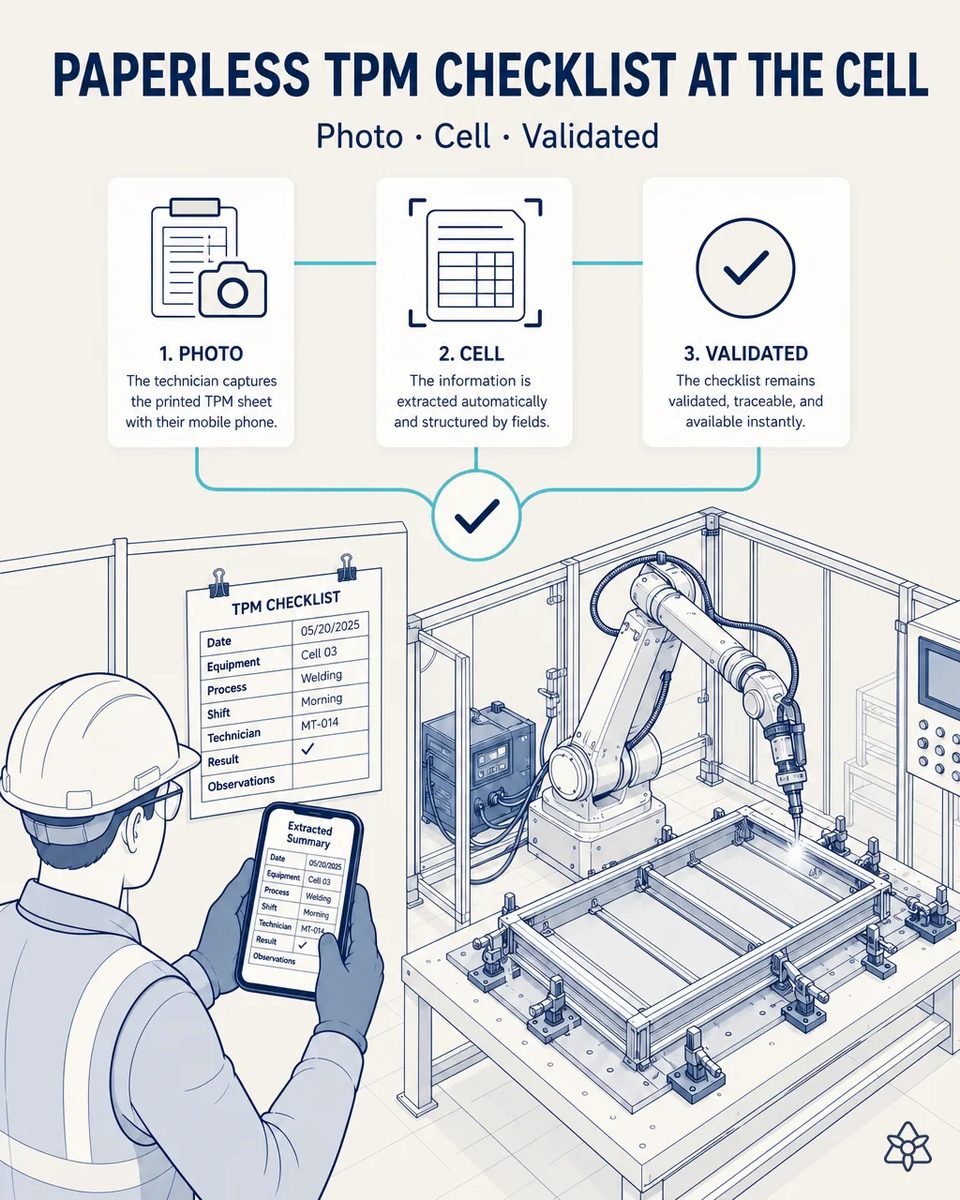
In a plant assembling aluminum battery trays, every robotic welding cell starts the shift with an autonomous maintenance checklist on paper: torch condition, nozzle, wire feeder, fixture clamps, compressed air. The operator fills it in, hangs it on the cell, and there it stays. With iLEAN Connect the operator takes a photo of the checklist when done. iLEAN recognizes the layout, extracts every checked item, every flagged anomaly and the signature, and stores it in central memory linked to the cell and shift. Zero change of habit: the paper stays the same.
The operator saw the worn nozzle; the planner finds out two days later.
In a plant assembling aluminum battery trays, every robotic welding cell starts the shift with an autonomous maintenance checklist on paper: torch condition, nozzle, wire feeder, fixture clamps, compressed air. The operator fills it in, hangs it on the cell, and there it stays. That sheet takes one or two days to reach the maintenance planner, if it gets there at all. When a cell fails, nobody can see that the operator had flagged a loose clamp three shifts earlier. The information existed, but it lived on paper.
- Every robotic welding cell on the tray line starts the shift with a paper checklist: torch condition, contact tip and nozzle, wire feeder, fixture clamps and compressed air. It is filled in, signed and hung on the cell guard. On a line with laser or friction stir cells the sheet changes, but the habit is the same.
- That sheet takes one or two days to reach the maintenance planner, if it gets there at all. Weekend and night-shift sheets are the ones most often lost. By the time they are typed, the anomaly they flagged has often already turned into a breakdown.
- When a cell stops on a misaligned frame or a burnt liner, nobody can see that the operator had flagged a loose clamp three shifts earlier. The information existed, but it lived on paper.
- The planner spends hours typing checklists into the CMMS instead of planning, and the anomalies that do get typed arrive too late to be scheduled into a planned stop.
Connect in photo mode — the TPM sheet on the cell guard stays exactly as it is.
It is the case that asks least of the floor: the operator keeps the same sheet and adds one photo. That is why it is usually the first approved on a tray line, and why every later case leans on the cell history it starts building. The TPM sheet is the first record of how each cell starts its shift.
- One phone photo and the checklist is in the system — With iLEAN Connect the operator takes a photo of the checklist when done. iLEAN recognizes the layout, extracts every checked item, every flagged anomaly and the signature, and stores it in central memory linked to the cell and shift. Zero change of habit: the paper stays the same.
- Flagged anomalies become a maintenance notification — If the checklist flags something abnormal, iLEAN proposes it as a maintenance notification in the CMMS, and the planner validates it before it goes in. Humans in command: the AI proposes, the person decides.
The welding cell TPM sheet on paper versus captured by photo
| Aspect | Today | With iLEAN Connect |
|---|---|---|
| Checklist to CMMS latency | 1-2 days, if it arrives | Instant, linked to cell and shift |
| Loose fixture clamp flagged | Forgotten on the cell guard | Proposed notification for the planner |
| Torch, nozzle and wire feeder history | Folders per month | Queryable per welding cell |
| Planner's transcription hours | Several per week | Validation only |
| Night and weekend sheets | The first to go missing | Captured like any other shift |
| The paper checklist itself | — | Unchanged: one photo added |
1-2 days of latency from checklist to CMMS → instant data. Anomalies flagged on paper and forgotten → maintenance notification proposed and validated by the planner.
Impact estimate — to be validated with your numbers.
The block below is an estimate to be validated against your plant's actual data. We put it forward so the committee has an order of magnitude; we refine it during the assessment.
- Estimated payback 4-9 months, depending on the number of welding cells and shifts.
- From 1-2 days of latency between checklist and CMMS to instant data, linked to the cell and shift that produced it.
- The return comes from catching anomalies that today stay on paper, before they turn into a stopped cell on a line that feeds the vehicle maker just in time.
- And from recovering the planner's transcription hours, which go back to scheduling interventions into planned stops.
Payback 4-9 months · from 1-2 days of latency to instant data (estimate to validate). The return comes from catching anomalies that today stay on paper and from recovering the planner's transcription hours. We are talking about an estimated payback of four to nine months depending on cells and shifts; an estimate to validate with your data.
And the fair question from the production manager
“What if it misreads a tick box or the operator's handwriting?” — reading fields from a checklist with a known layout is an anchored task, where the best models drop below 1.5% error [1]. And there is a second net: nothing enters the CMMS as a notification until the maintenance planner has seen it and validated it, and a low-confidence field is flagged for a person to confirm.
[1] OpenAI paper "Why Language Models Hallucinate", 2025 — on the reliability of AI in anchored tasks.
What people ask about the welding cell TPM checklist
Do we have to redesign our TPM checklist for the welding cells?
No. iLEAN learns the layout you already use, including the handwritten observations box. The sheet that hangs on the cell guard today is the one that gets photographed tomorrow. If a cell type has its own sheet, for example laser or friction stir cells, each layout is recognized separately.
What happens when the operator flags an anomaly on the sheet?
iLEAN proposes it as a maintenance notification in the CMMS, with the cell, shift and photo attached. The planner validates or discards it before it goes in, so nothing is written without a person deciding. A discarded proposal is kept too, so the history shows what was flagged and why it was not acted on.
Does the operator need a new app or account?
A phone with the capture already set up is enough. The gesture is one photo when the checklist is done, and the shift and cell are taken from the context. The whole gesture takes a few seconds at the end of the checklist, before the first tray is loaded.
Can maintenance see which cells repeat the same anomaly?
Yes. With every checklist stored per cell, a nozzle or clamp flagged again and again shows up as a pattern instead of as isolated sheets in a folder. That is usually the first report the maintenance manager asks for, because it shows where the next stop is likely to come from.
Do we need the CMMS integration from day one?
No. The case starts against iLEAN's central memory, and the push to the CMMS is connected once the planner has seen the value of the captured data. That keeps the first weeks free of IT work and lets the welding cells start capturing on day one.
More cases from this series
- IATF evidence pack, always readyEvery inspection, leak test and work order generates evidence; iLEAN Agents builds the IATF and customer…
- A tray line without surprise stopsConnect, Edge, Agents and JIDOKA AI correlate every signal per cell and give the maintenance manager a…
- The legacy CNC that now talksAn external camera reads the panel of an offline CNC center: spindle load and alarms in central memory,…
- The downtime spreadsheet, straight to ERPiLEAN reads the downtime sheet on save and, after validation, pushes it to the ERP: up-to-date OEE and…
- Extrusion receiving with a certificate photoPhotograph the delivery note and material certificate: alloy, heat number and quantities into the ERP…
- Hands-free maintenance on the roundThe technician dictates observations while walking the line; iLEAN structures them per cell and shift so…
Tell us how long a welding cell checklist takes to reach your CMMS today.
We work on your plant's real data, not ours. Assessment with no commitment.
Request estimated ROI within 48h ‹ See all cases of battery trays See automotive