From goniophotometer Excel to live QM ERP, with license savings
In a premium LED headlight plant, the photometry lab saves every batch to an Excel file: intensity curve by angle, uniformity, color temperature. That Excel is where the real data lives — but the QM ERP requires manual transcription with a 20-30 day lag. With iLEAN Connect the Excel file is absorbed the moment it's saved, validated on the owner's tablet and pushed to the QM ERP via API. A 50-80% reduction in the lab's QM module licenses.
Two parallel worlds: the real goniophotometer Excel and the official QM ERP.
In a Tier 1 premium LED headlight plant, the photometry lab keeps its own Excel: intensity curve by angle, uniformity and color temperature of each batch, measurement by measurement from the goniophotometer. It's the data the lab actually works with, updated to the minute in the shared folder. The official QM ERP, by contrast, receives those same results typed in by hand by someone who copies from the Excel into the system — with a 20-30 day lag.
- Two parallel worlds — the real Excel with the live per-batch data and the official QM ERP with data transcribed 20-30 days later. The system the corporation treats as "the truth" runs almost a month behind the lab's reality.
- Half a day a month copy-pasting — one lab person spends half a working day each month transcribing from the Excel into the QM ERP. They don't analyze, don't improve, don't release batches faster: they type what the goniophotometer had already measured weeks earlier.
- IATF auditor with uncross-referenced data — when the audit asks to trace a photometric result from the original sheet to the official record and the dates don't line up, the outcome is a minor nonconformity for missing Excel↔ERP traceability. And the usual defense — "it's in the Excel, it just hadn't been entered yet" — is exactly what the auditor doesn't want to hear.
The cost isn't only about the audit: it's about licenses. For that typing to be possible, several lab people need access to the ERP's QM module — not because they manage quality in the system, but because it's the only way to enter their own measurement data.
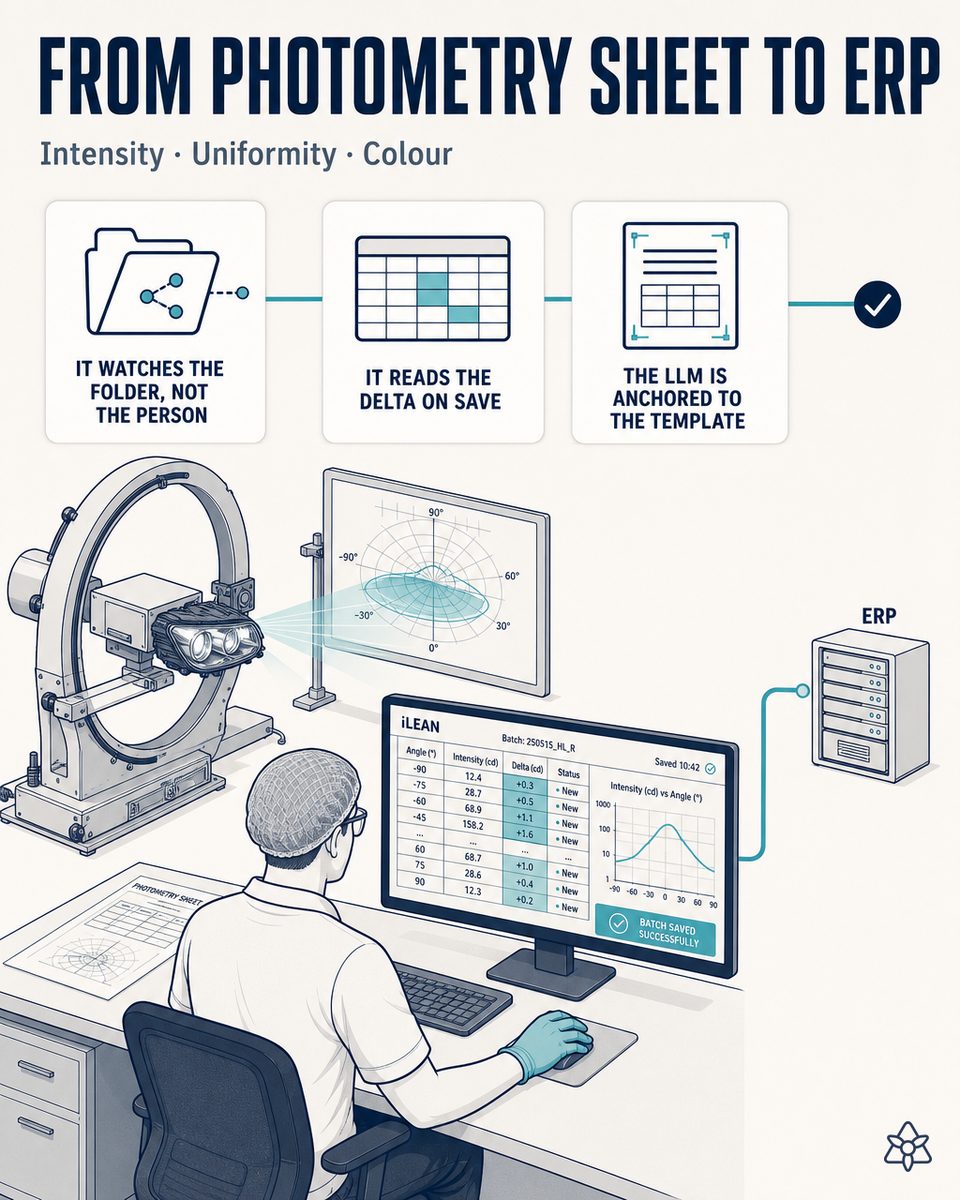
Connect listens inward: it watches the folder, not the technician.
The goniophotometer Excel doesn't need to disappear or change format. It needs the data that already exists in that sheet to reach the QM ERP without anyone having to type it again, and without the official record running a month behind the measurement. That's what Connect is for.
Connect watches the shared folder where the lab saves its Excel — it does not watch the technician who fills it in. When the file is saved, it reads the delta, presents it to the owner on their tablet and, after validation, pushes it to the QM ERP via API. The lab keeps working exactly as always.
How Connect operates on the photometry Excel of a Tier 1 premium LED headlight plant:
- Connect watches the folder, not the human — it points at the network location where photometry saves the Excel for each batch. It doesn't intervene while the file is being filled in, doesn't time anyone: it only detects when the file has been saved.
- Reads the delta on save — the moment the Excel is saved, Connect identifies which rows are new since the last push (intensity curve by angle, uniformity, color temperature) and extracts them, without reprocessing the whole history each time.
- LLM anchored to the real template — the model doesn't generate free data: it recontextualizes exactly what's in each cell — batch, program, cavity and photometric parameters — against the lab's real template, including its own columns and its usual order.
- Delta summary to the owner — before anything reaches the QM ERP, the owner sees a summary of what was read on their tablet: confirm or correct. The data doesn't enter on its own.
- Validation and push via API — once validated, Connect writes the result directly into the QM ERP, with full traceability of who validated what and when. The Excel↔ERP misalignment is resolved by design, batch by batch.
Excel and QM ERP disconnected vs. Excel and QM ERP with Connect in between
| Aspect | Excel and QM ERP disconnected | With iLEAN Connect |
|---|---|---|
| Excel-QM ERP lag | 20-30 days | Zero-second, the moment the file is saved |
| Manual transcription | Half a day/month of one person copy-pasting | Zero — automatic push via API after validation |
| IATF auditor cross-references Excel and ERP | Uncross-referenced data = minor nonconformity | Automatic batch-to-program-to-PPAP cross-reference |
| Per-batch photometric data | Live only in the lab's Excel | Live in the QM ERP too, same day |
| QM module licenses | One per technician, just to enter measurements | 1 license — the owner who validates |
| Batch-program-cavity traceability | Manual reconstruction on request. Estimate to be validated. | Recorded in every push, queryable instantly |
Impact estimate for your plant — to validate with your numbers.
The following block is an estimate to be validated with the specific data of your plant and your ERP's actual invoice. We lay it out so the committee has an order of magnitude; we refine it in the diagnosis.
- Tier 1 premium LED headlight plant, with its own photometry lab, a goniophotometer that exports to Excel and a corporate ERP whose QM module is billed per active user.
- If 5 lab people access the QM module only to enter measurement data, that's 5 expensive licenses paying for nothing but typing. With Connect only the license of the person who validates — the lab owner — is needed: from 5 licenses to 1.
- Typical reduction of 50-80% in the lab's QM module licenses, with a savings range of €15-40K/year/plant — not a one-off project saving but a recurring cost that disappears from the invoice. Estimate to be validated against the ERP's actual invoice.
- Estimated payback between 4 and 8 months, counting the setup of Connect on the lab's folder and the anchoring to the goniophotometer's real template. Estimate to be validated with your numbers.
- Side lever: with the photometric data live per batch in the QM ERP from second zero, the batch-to-program-to-PPAP cross-reference the IATF auditor asks for stops being a manual reconstruction and becomes a query. That relief of quality workload isn't included in the license calculation.
And the CFO's reasonable doubt
"What if the LLM misreads a cell in the Excel and the wrong intensity reaches the QM ERP?" — hallucination is a problem of free generation, not of anchored tasks. In tasks where the AI merely recontextualizes a specific piece of data from one medium to another (reading a cell in the Excel and moving it to the matching field in the QM ERP), the best models brought the error below 1.5% [1]. And even so, the critical part isn't decided alone: Connect holds the push until the lab owner validates on screen. The three safety rings are there precisely for this.
[1] OpenAI paper "Why Language Models Hallucinate", 2025 — on the reliability of AI in anchored tasks.
What people ask about taking the goniophotometer Excel to the QM ERP with Connect
Why do the goniophotometer Excel and the QM ERP live apart?
Because they were born in two different worlds. The photometry lab works in its own Excel, saved to a shared folder — intensity curve by angle, uniformity, color temperature, batch by batch, updated to the minute. The QM ERP, the system the corporation treats as "the truth", receives those same results typed in by hand 20-30 days later by someone who copies from the Excel into the system. Neither world is wrong: the Excel is where the live data lives and the ERP is where the official record lives. The problem is the gap between them — the official record runs almost a month behind the lab's reality, and nobody reconciles the two until an IATF auditor asks for the cross-reference.
How does "listening inward" work without watching the person?
Connect watches the shared folder where the photometry lab already saves the goniophotometer Excel — it does not watch the technician who fills it in. When the file is saved on closing the batch measurement (intensity curve by angle, uniformity, color temperature), Connect detects the delta — only the rows that are new since the last push — and reads it with an LLM anchored to the lab's real template. The technician keeps working with the same Excel as always, the same tabs and the same per-batch habit; there is no new form to learn and no screen to install next to the goniophotometer.
How do the license savings actually materialize?
The logic is about license consumption, not hours: the ERP's QM module is billed per active user, and if 5 lab people access QM only to enter measurement data, that's 5 expensive licenses that add no quality management — just typing. With Connect only one person — the owner who validates before the push — needs to keep a license. That concentration typically means a 50-80% reduction in the lab's QM module licenses, with a savings range of €15-40K/year/plant and an estimated payback of 4-8 months. It is an estimate to be validated against your ERP's actual invoice — which is why the first step is the pilot on your own numbers.
What does the IATF auditor ask about Excel↔ERP↔PPAP?
The auditor asks to trace a photometric result from the original goniophotometer sheet through to the official record — and, for a Tier 1, on to the PPAP of the affected program. When the Excel and the QM ERP are 20-30 days apart, the dates don't line up and the trail breaks: a minor nonconformity for missing Excel↔ERP traceability. With Connect the data is pushed the moment the file is saved and every push is stamped per batch — what was read, who validated it and when — so the batch-to-program-to-PPAP cross-reference stops being a manual reconstruction and becomes an instant query. The usual defense — "it's in the Excel, it just hadn't been entered yet" — is exactly what the auditor no longer needs to hear.
Does it handle any goniophotometer Excel format?
Yes. Connect doesn't depend on a fixed layout: the LLM anchored to the lab's real template reads exactly what's in each cell — batch, program, cavity and photometric parameters — including the lab's own columns and its usual order. If the lab adds a column, renames a photometric parameter or reorders the per-program tabs, Connect doesn't break silently: it detects the variation and, if the change is ambiguous, flags it for the owner's review instead of pushing a misread value to the QM ERP. And it pushes the validated data via API, so it works the same with the QM module of a corporate ERP, a departmental quality system or a custom development — as long as it exposes an endpoint to write the batch result.
More cases from this series
- Early human validation at the FAI bench: two taps, IATF-traceable signatureNothing enters the QM ERP without a human signature; the iLEAN tablet shows a summary and the quality…
- The assembly supervisor dictates while walking, and iLEAN listensThe headlight supervisor dictates while walking; iLEAN structures it as a nonconformity candidate linked…
- LED reel receiving in 5 minutes with full traceabilityPhotograph the delivery note and reel labels; the ERP receives part number, binning and MSL in one tap.…
- OEM spec changes that reach the line on timeiLEAN monitors the customer resident's mailbox 24/7, cross-checks live orders and current PPAP, and…
- Paperless LED headlight batch startup, with production order and PPAP at zero-second latencyDigitize the production order, the PPAP checklist and the first LED reel label at zero-second latency:…
- Vintage vacuum metallizer now talks, with zero replacement CAPEXAn external camera reads the vacuum and temperature curve off the reflector metallizer's vintage panel —…
Cut QM module licenses without losing traceability — Connect pilot on your goniophotometer Excel in 6 weeks.
We work on your plant's real data, not ours. Diagnosis, no commitment.
Connect pilot on your goniophotometer Excel — 6 weeks ‹ See all LED headlight cases See automotive