The efficiency spreadsheet stops living apart from the ERP
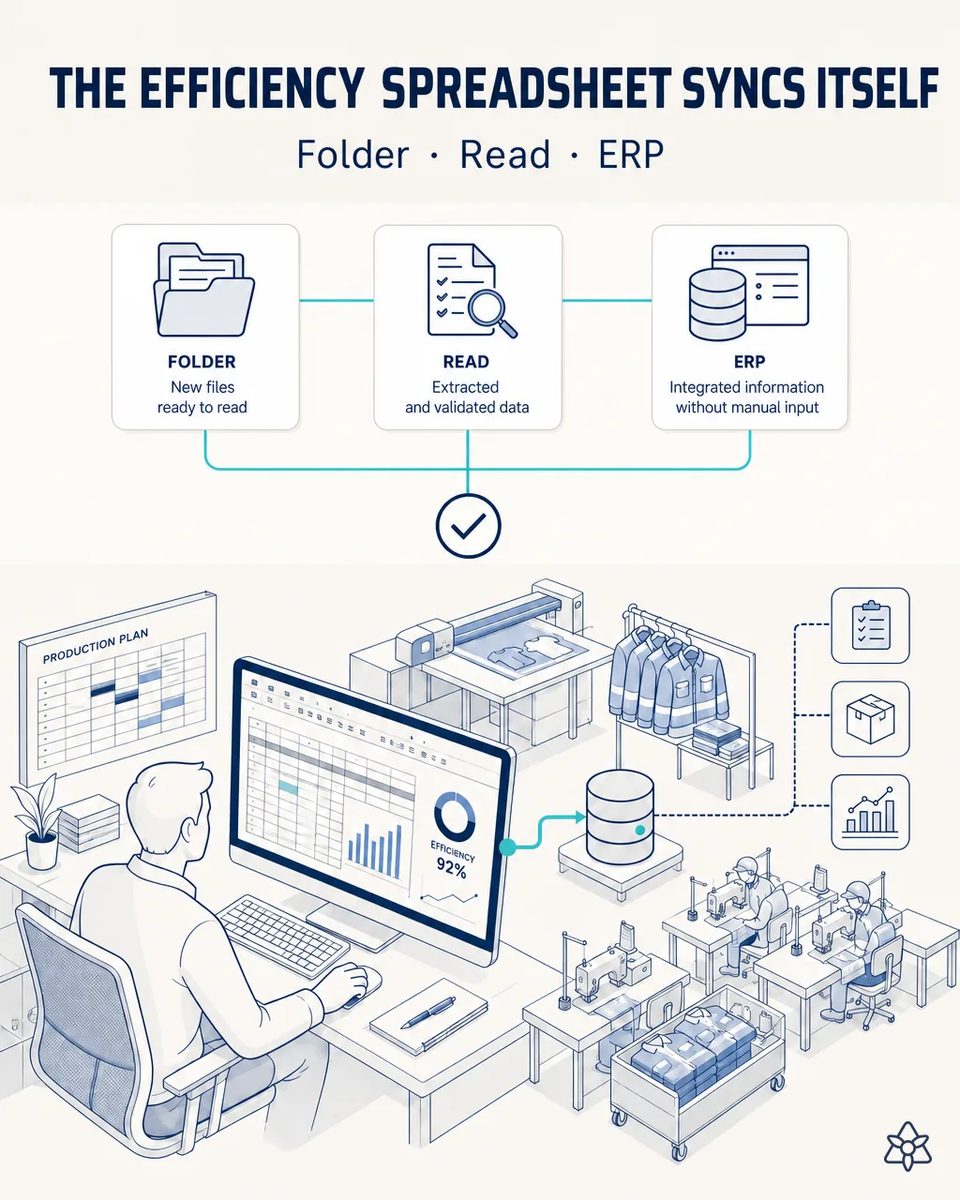
The continuous-improvement lead fills in a spreadsheet every shift with efficiency and waste per line. iLEAN Connect detects the spreadsheet, absorbs it in real time, and after validation syncs it to the ERP automatically.
The real numbers live in a spreadsheet the ERP never sees.
two parallel worlds — the real spreadsheet (live data) and the official ERP (data re-typed weeks late by someone who spends hours a week copy-pasting and making mistakes).
- Every shift, the continuous-improvement lead fills in efficiency, minutes produced and waste per sewing line in a shared spreadsheet. That is the live data. It is what the line leads look at, and what gets argued over in the morning meeting.
- The ERP holds the official version, re-typed weeks late by someone who spends hours a week copy-pasting. By the time it is there, the shift it describes is long gone.
- Every copy-paste is a chance to put line 3's efficiency on line 4, or a work shirt order's waste on a coverall order. The error is small on the day and large in the month-end report. Nobody notices until the monthly report disagrees with what the line leads remember.
- Meanwhile the plant pays production and planning module licenses for people whose only interaction with the ERP is that re-typing. It is a cost nobody questions because it has always been there.
Connect listening inward — the shared folder, read the moment the file is saved.
Connect "listen inward" watches the shared folder and reads the delta the moment the file is saved; an anchored LLM parses every cell, it's validated on screen, and synced to the ERP via API.
Nobody changes their spreadsheet. Not the template, not the habit, not the shared folder it lives in. Connect reads the delta the moment it is saved, a person validates it on screen, and the ERP receives it via API. The licenses that only existed for re-typing stop being needed. And the efficiency the ERP shows is finally the same one discussed at the line in the morning.
The parallel spreadsheet versus the synced spreadsheet
| Aspect | Today | With iLEAN Connect |
|---|---|---|
| Lag between floor and ERP | Weeks | Seconds after saving |
| Re-typing | Hours every week | Zero |
| Line or order swapped by copy-paste | Discovered at month-end | Caught at validation |
| Production and planning licenses | One per person who types | Only the validator |
| The improvement lead's spreadsheet | — | Unchanged |
| Efficiency by line and style | Two versions that disagree | One version, in the ERP |
weeks of lag → zero seconds. Hours-per-week of transcription → zero.
Impact estimate — to be validated against your actual license invoice.
The block below is an estimate to be validated against your plant's actual data. We put it forward so the committee has an order of magnitude; we refine it during the assessment.
- Estimated payback 4-9 months.
- CFO angle: typical 50-80% reduction in production and planning module licenses, because only the validator needs one. It is usually the figure that gets the finance team into the conversation.
- Hours per week of transcription go to zero. Nobody copies a cell from one screen to another again. That time goes back to the improvement work the lead was hired for.
- And the lag between the floor and the ERP goes from weeks to seconds. Planning works with this week's efficiency, not last month's.
CFO angle — typical 50-80% reduction in production/planning module licenses (only the validator needs a license), estimated 4-9 month payback. *Estimate to validate*.
And the fair question from the production manager
“What if it puts a figure in the wrong line or the wrong cell?” — parsing a spreadsheet whose columns and lines you defined is an anchored task, where the best models drop below 1.5% error [1]. And a person validates the change on screen before it is synced, with the edited cells highlighted, so a misplaced value is seen before the ERP sees it. Formulas and totals are checked too, so a broken sum is flagged instead of being synced.
[1] OpenAI paper "Why Language Models Hallucinate", 2025 — on the reliability of AI in anchored tasks.
What people ask about syncing the efficiency spreadsheet
Do we have to change the spreadsheet template?
No. The template stays as the improvement lead built it; the column layout is learned at commissioning. The lead keeps formulas, colors and tabs exactly as they are, because nothing is written back into the file.
What if someone adds a column or a new sewing line?
The change is detected and shown at validation, so the mapping is adjusted once instead of breaking silently. That is what keeps the sync reliable when a new line or a new style is added mid-season.
Does it read the whole file every time?
Only the delta since the last save, which is what keeps it in seconds and makes validation quick. The validator sees only what changed since the previous save, not the whole sheet again.
Which ERP modules does it write to?
Those where your efficiency and waste data should live, via the ERP's API. It is defined with whoever owns the ERP. Nothing is written to modules nobody agreed on, and every write is logged with its validator.
Where does the license saving come from exactly?
From the people who only had a production or planning license to re-type the spreadsheet. With the sync, only the validator keeps one. The exact saving depends on your licensing model, which is why we estimate it against your actual invoice.
More cases from this series
- The audit dossier organizes itselfEvery critical changeover generates its own auditable dossier. Agents organizes it by standard.…
- The flagship system against size-color mix-upsConnect + Edge + Agents coordinated protect every shipment against mislabeled size/color mixes. Zero…
- The bundle ticket enters the system with one photoOne photo of the bundle ticket at the cutting table gets it into the central system instantly. Zero lost…
- Digitize your vintage cutter without touching the panelAn external camera reads the automatic cutter's panel without touching it. Cutting history digitized…
- The fabric delivery note gets digitized with one photoOne photo of the delivery note and roll labels digitizes fabric receiving. Full dye-lot-to-garment…
- The fabric supplier's alert arrives on timeiLEAN reads the fabric supplier's email instantly and cross-references active cutting orders. Zero…
Tell us how many ERP licenses exist in your plant only to re-type spreadsheets.
We work on your plant's real data, not ours. Assessment with no commitment.
Request estimated ROI within 48h ‹ See all cases of workwear See apparel