AI proposes, the person validates: two taps on the tablet
The most common objection a quality team raises about AI is a fair one: "what if it gets it wrong and contaminates my records?". In a server plant, where each unit carries dozens of associated component serial numbers and the customer audits the genealogy, a wrong record is worse than a missing one. iLEAN's answer is structural: nothing it captures enters the central system without a person having seen it first. Every capture, whether a photo of a rework sheet, a dictated finding or a label read at receiving, appears on the station tablet as a visual summary, and the person responsible confirms or corrects it with two taps. Seconds of latency, no typing.
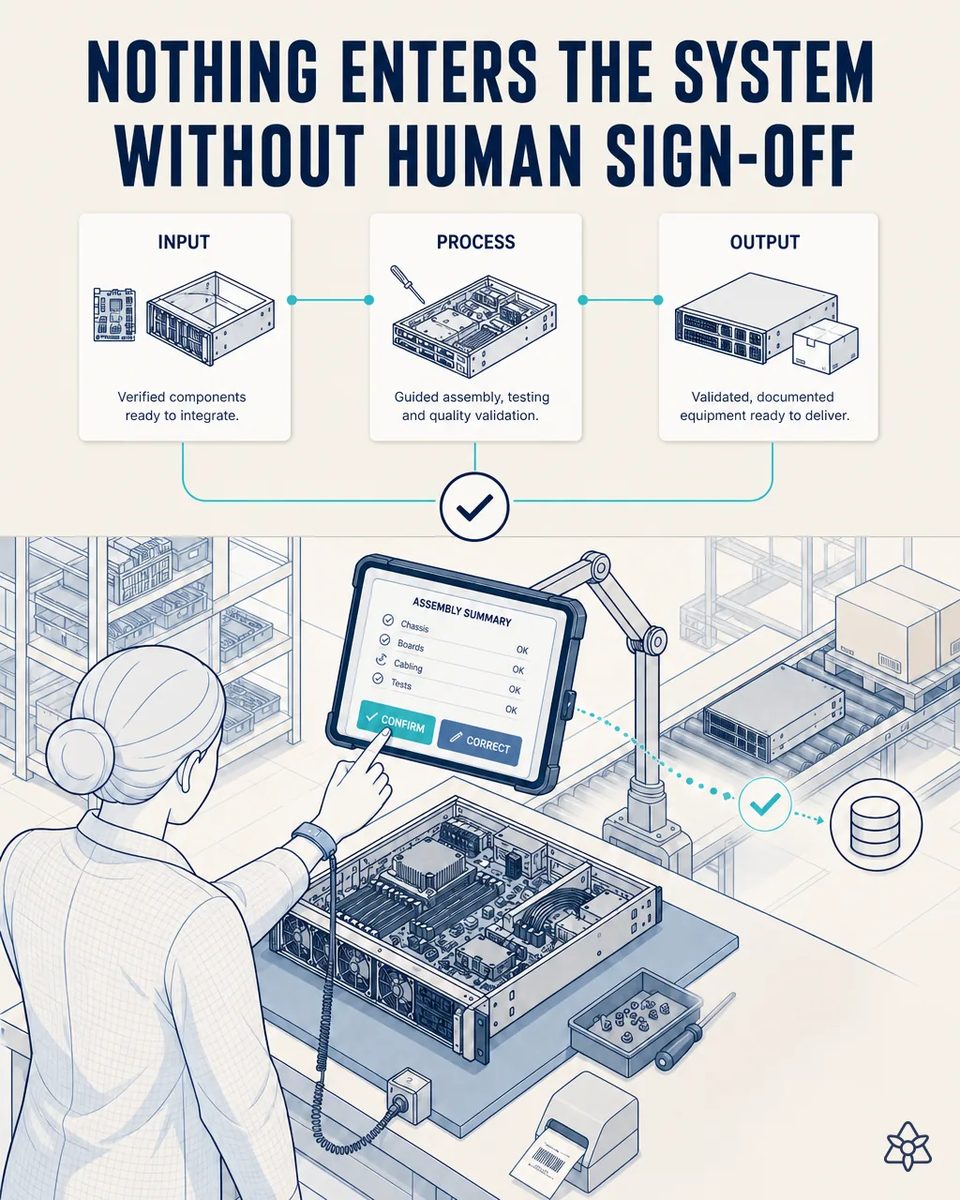
A wrong genealogy record is worse than a missing one.
The team fears an autonomous system writing into the product genealogy on its own. At the same time, nobody has time to type. The usual outcome is that the information is not captured, or is captured late and by hand.
- Each server carries dozens of associated component serials — processors, DIMMs, drives, power supplies, accelerator cards — and the customer audits that genealogy. A record that pairs the wrong drive with a chassis is a finding waiting to happen.
- The quality team's objection is fair: what if the AI gets it wrong and contaminates the records the plant has to defend in front of the customer?
- At the same time, nobody on the line has time to type. Operators build, test and pack against takt, and data entry is the first thing dropped when the shift gets tight.
- So the usual outcome is the worst of both: the information is not captured, or it is captured late, by hand and by someone who did not see the unit.
Connect with early human verification — the station tablet is the gate to the system.
Connect early human verification mode. Each capture is shown on the tablet with the fields read and their confidence level; anything doubtful is highlighted. The person validates with two taps and only then does the data cross to the ERP or the execution system, with a record of who validated and when. On tasks grounded in a document the reading error rate is very low, and human validation covers the rest.
This is the piece that makes the rest approvable in a customer-audited plant. AI reads and proposes; a named person confirms in two taps; only then does anything cross into the genealogy. Nobody has to trust the model blindly, and nobody has to type. When the customer audits the genealogy, every record has a name behind it.
Genealogy typed later versus genealogy confirmed at the station
| Aspect | Today | With iLEAN Connect |
|---|---|---|
| Component serial pairing per chassis | Typed later, or skipped | Proposed by AI, confirmed at the bench |
| Doubtful field on a capture | Nobody knows it was doubtful | Highlighted with its confidence level |
| Who stands behind a genealogy record | Whoever keyed it | The person who confirmed it, with time |
| Operator time per capture | Minutes at a terminal | Two taps, seconds |
| A correction to what AI read | Not applicable | Stored with its author as feedback |
| Unsupervised writes to the ERP | — | Impossible by design |
Data not captured or typed in late → data captured and validated in seconds. Fear of contaminated records → every record with an identified validator.
Impact estimate — to be validated with your numbers.
The block below is an estimate to be validated against your plant's actual data. We put it forward so the committee has an order of magnitude; we refine it during the assessment.
- No standalone payback: this is an enabling piece, and we do not attach a range to it because its value shows up in every other case it unlocks.
- Without early human verification, the other cases do not get approved in a customer-audited environment; with it, each capture arrives with an identified validator.
- Data that today is not captured, or is captured days late, enters in seconds and with its author, which is what an auditor of the genealogy wants to see.
- And the fear of contaminated records is answered by architecture, not by a promise: the confirmation step cannot be switched off from the line, not even on the busiest night of the quarter.
Enabling piece for the whole system: without early human verification, the others do not get approved in a customer-audited environment. *Strategic value, estimate to be validated*.
And the fair question from the production manager
“If a person checks everything anyway, what has the AI actually saved us?” — the work it removes is assembling the record, not deciding on it. Reading serials, labels and sheets is an anchored task, where the best models stay below 1.5% error [1], so most confirmations are a glance and a tap, which is what keeps the gate from becoming a bottleneck. The doubtful fields come highlighted, and every correction is stored, so the system learns exactly where its reading needs help.
[1] OpenAI paper "Why Language Models Hallucinate", 2025 — on the reliability of AI in anchored tasks.
What people ask about confirming server line captures on the tablet
How long does a confirmation take at a server assembly station?
A few seconds. The summary arrives with serials and fields already filled in, and the person confirms or corrects without leaving the bench or interrupting the build. At high volume that is the difference between a gate people accept and one they work around.
Can iLEAN be set to write to the genealogy without a person?
No. It is not a setting that can be relaxed under pressure; it is how the system is built. Data crosses only after a human confirmation, and the confirmation carries a name and a timestamp.
What is recorded when an operator corrects a component serial?
The original reading, the corrected value, who corrected it and when. That trail is useful in a customer audit and also shows where the reading should improve, for example on one supplier's label or one station's handwriting.
Which captures go through the tablet?
All of them: photos of rework sheets, findings dictated on a quality walk, labels read at receiving, values read from a test panel. Every one shares the same gate, so the team learns one screen instead of one per case.
Does this have to be in place before the other server cases?
In practice yes, because it is what makes the others acceptable to the customer and to your own quality team. It is usually deployed together with the first case, so it never appears as a separate project.
More cases from this series
- When a complaint comes in, that unit's evidence in minutesImages, test records and validations for each server indexed by serial number: the dossier for a…
- Zero configuration complaints: verified from order to palletFour AI verification rings — material, kit, cabling and packout — so no server ships with the wrong…
- The veteran test equipment that now hands over its dataAn external camera reads the burn-in chamber and safety tester panels and ties the curve to each serial…
- The engineering change reaches the line before the error doesiLEAN reads the customer's engineering change notice, cross-checks open orders and kits, and alerts…
- The quality walk that no longer depends on a notebookThe quality supervisor dictates findings while walking the lines; iLEAN logs them by line, order and…
- The label comes from the active order, not from the keyboardSerial, box and pallet labels print from the active order, with no keying or manual templates, and are…
Bring a document from your line and see the validation screen working with it.
We work on your plant's real data, not ours. Assessment with no commitment.
Request estimated ROI within 48h ‹ See all cases of server assembly See electronics