Nothing enters the ERP without a human sign-off
The cultural brake on shop-floor AI is the fear of ownerless data in the ERP. iLEAN solves it with a tablet in every cell: everything captured appears as a visual summary and the cell lead confirms or corrects in two taps before the data crosses into the central system.
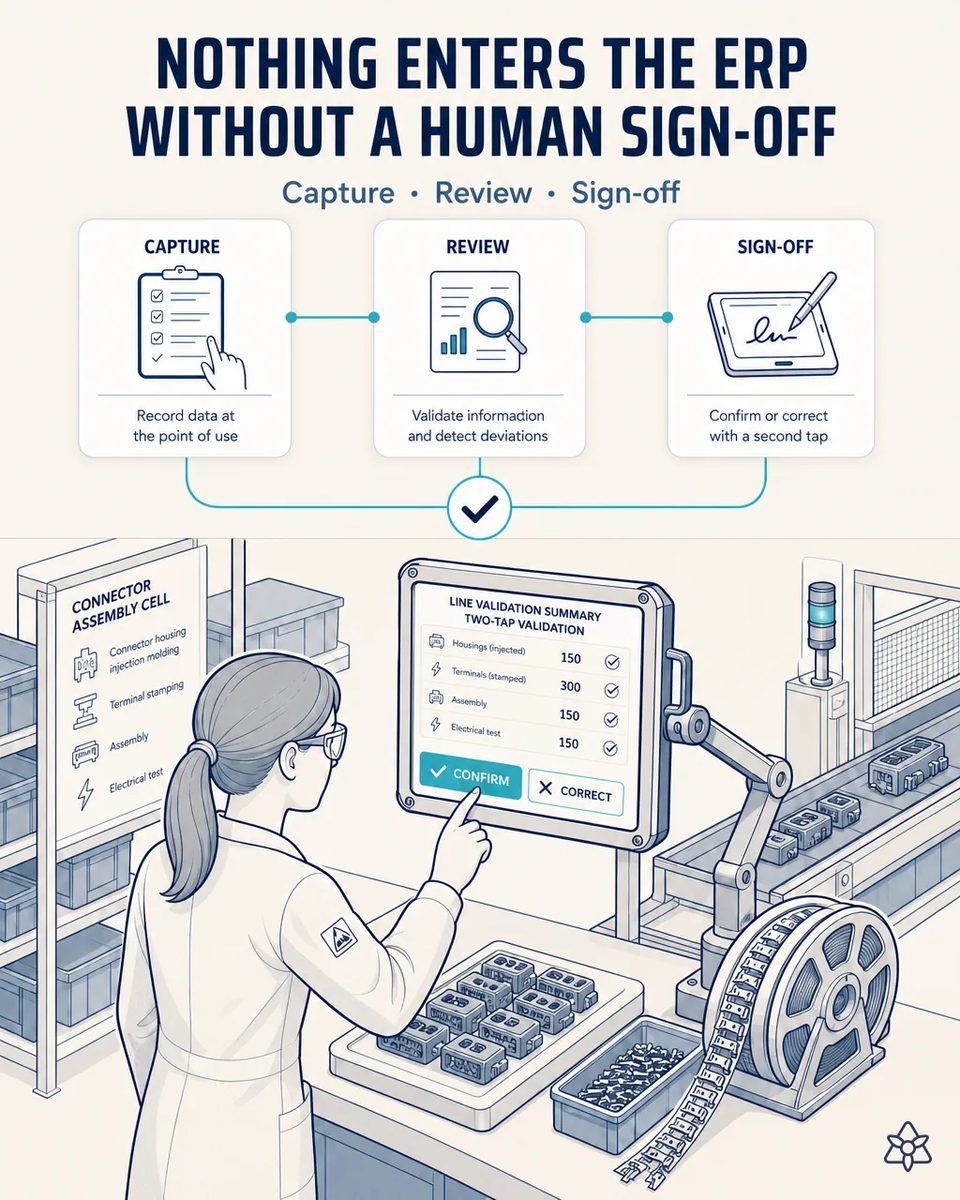
Nobody wants ownerless data in the ERP, and nobody wants to type more.
The main brake on AI on the shop floor is not technical: it is the fear of a system pushing data on its own and polluting the ERP master. At the same time, operators do not want to type more.
- The real brake on shop-floor AI in a connector plant is cultural: the fear of a system writing on its own and polluting the ERP master that PPAP files and customer portals depend on. One bad batch of records is enough to lose trust for months.
- At the same time, operators at the stamping press or the insertion cell will not take on more typing, so data is entered late by someone who did not see the lot, or never entered at all, and the system ends up knowing less than the floor.
- A terminal lot booked against the wrong work order is not caught that day; it surfaces when a containment has to be bounded and the genealogy does not add up, so the containment is widened as a precaution.
- Without a signature per record, an IATF 16949 auditor sees data, not evidence, and asks who stands behind each value.
Connect with early human verification — two taps in the cell, then the ERP.
iLEAN solves both with an industrial tablet in every cell. Everything it captures, by photo, voice, email or file, appears as a visual summary: part number, terminal lot, quantity, first-piece result. The cell lead confirms with two taps or corrects before the data crosses over. If the terminal lot does not match the work order, the tablet flags it and the data waits until a person resolves it. The interface is built to validate in two seconds, not to capture. There is no learning curve: the operator looks, confirms and keeps working.
This is the piece the other eleven rest on. Capture can be automatic precisely because crossing into the ERP never is: a person confirms, and that person's name stays on the record. That is what makes quality willing to switch the rest on, one case at a time, with full visibility of what crosses and who let it through.
The unsigned ERP versus the ERP with a cell sign-off
| Aspect | Today | With iLEAN Connect |
|---|---|---|
| Terminal lot vs. work order mismatch | Found during a containment | Flagged on the tablet and held |
| Name on each record | Whoever typed it | The cell lead who confirmed |
| Time per validation | Minutes at a terminal | About two seconds |
| Lots left uncaptured for lack of trust | Common | Captured, because they are checked |
| Correction history | Overwritten | Kept with author and time |
| Training needed | — | None: look, confirm, keep working |
Before: unvalidated data in the ERP, or data never captured out of distrust. After: data validated in seconds, owned, and a clean master.
Impact estimate — to be validated with your numbers.
The block below is an estimate to be validated against your plant's actual data. We put it forward so the committee has an order of magnitude; we refine it during the assessment.
- No standalone payback: an enabling piece of the whole architecture, strategic rather than monetizable on its own, so we do not fix a payback range for it.
- Without it, no other case gets signed: quality does not approve AI that writes into the master by itself, and rightly so.
- A clean master is what keeps PPAP data, customer portals and genealogy queries trustworthy when a customer asks.
- Every correction is stored with its author, so you can see exactly where capture needs improving and how the error rate evolves month by month, cell by cell.
An enabling piece for the whole architecture: without it, no other case gets signed. Strategic value, not monetizable on its own. Estimate to be validated.
And the fair question from the production manager
“If the cell lead confirms everything, what does the AI save?” — the assembling. Today somebody has to find the work order, the terminal lot and the first-piece result and type them in. Here they arrive already extracted, through tasks anchored to known documents and screens, where the best models stay below 1.5% error [1]; the person only checks, confirms or corrects. The time saved is in the search and the typing, not in the decision. And every correction teaches the system where its extraction fails.
[1] OpenAI paper "Why Language Models Hallucinate", 2025 — on the reliability of AI in anchored tasks.
What people ask about the cell sign-off tablet
What exactly does the cell lead see before confirming?
A short card: part number, terminal lot, resin lot, quantity and first-piece result, with any mismatch against the work order highlighted in color. Nothing else competes for attention on the screen.
What happens when the terminal lot does not match the work order?
The record is held on the tablet and does not cross. It waits until a person resolves it, which is precisely the error that would otherwise surface in a containment. The hold and its resolution are both logged.
Does it work with gloves at the stamping press?
Yes. The interface uses large buttons built for gloved hands, and each validation is designed to take about two seconds. The tablet is mounted where the cell lead already stands, so nobody walks to a terminal or leaves the cell unattended to enter data.
Can a confirmation be traced in an IATF 16949 audit?
Yes: the summary shown, who confirmed it, when, and what was corrected are all stored, which turns captured data into evidence. The record is exportable for the audit file, filtered by lot, cell or period.
Can low-risk data skip the tablet?
Some fields can be configured as informational, but anything that writes to the ERP master goes through a person. That is the architecture, not a setting, and it cannot be switched off from the floor or bypassed under production pressure.
More cases from this series
- IATF 16949 evidence pack, always readyiLEAN Agents organizes each lot's evidence by standard and customer: IATF 16949 and PPAP audits prepared…
- Zero escapes to the automotive customerFour coordinated rings (order, test, vision and evidence) catch on the line what reaches the customer…
- Photograph the traveler at lot start-upOne photo of the traveler and the lot exists in the system from start-up: terminal-resin-assembly…
- The electrical tester, stitched into the MES and ERPiLEAN stitches the harness electrical tester into the MES and ERP: every result linked to serial and…
- The shift supervisor speaks, iLEAN recordsThe supervisor speaks while walking; iLEAN structures the incident by cell, lot and shift and replies…
- The metrology spreadsheet reaches the ERP on its owniLEAN reads the metrology spreadsheet on save, validates it with quality and posts it to the ERP. Up to…
Tell us what quality would need to see before letting captured data reach your ERP.
We work on your plant's real data, not ours. Assessment with no commitment.
Request estimated ROI within 48h ‹ See all cases of electronic connectors See electronics