The supplier's email at 8:14 can't wait for the purchasing manager's first free slot.
The supplier emails you at 8:14 in the morning: today's flour order won't arrive — it will ship the day after tomorrow. That email dies in the purchasing manager's inbox until their first free slot of the day, and the line starts at 9:00 with a recipe that will run out of ingredient by mid-afternoon. iLEAN Connect reads the email at second zero, crosses it with the active production order and alerts production and planning before the hopper is loaded.
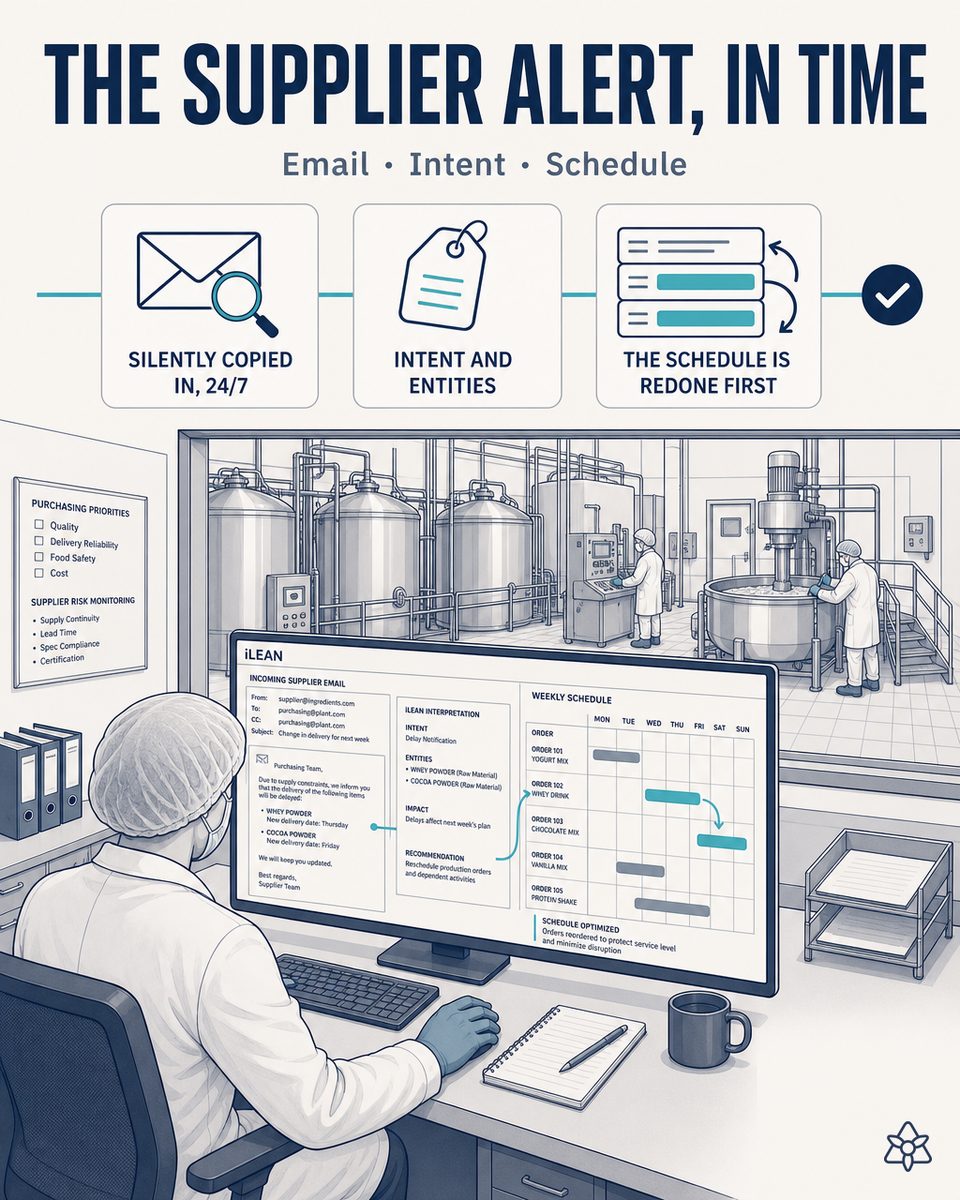
The alert reaches a person, not the system — and the plant finds out late.
In plants that make food products, the day's critical raw material moves by email between the supplier (flour, seasoning, oil, packaging film) and the purchasing manager. The classic chain works like this:
- 8:14 — the supplier sends the email: "good morning, the flour truck scheduled for today is not leaving; it will most likely arrive the day after tomorrow". That email lands in the purchasing manager's inbox.
- 8:15 to 10:30 — the email dies in the inbox. The purchasing manager is in a meeting, out on the floor, on the phone with another supplier. The message will show as read at their first free slot of the day, not before.
- 9:00 — the line starts on the day's production order, which assumes flour is available. The hopper is loaded from live stock, the shift's SKUs are scheduled, the afternoon recipe change is planned.
- 15:30 — the plant discovers the problem: the live flour stock is not enough to finish the work order. Someone shouts for the shift lead, the purchasing manager gets a call, and production is replanned on the fly with rework or a line stop.
The alert existed at 8:14. The plant acted on it at 15:30. In between, seven hours lost — and a replanning done after the fact, with dead stock, rework or an SKU change without warning the customer. The classic system (email + purchasing manager + manual forwarding) works 95% of the time; that 5% is what wrecks the month's margin.
iLEAN Connect in "outward listening" mode — the mailbox stops being the bottleneck.
The supplier-email problem is not a lack of information: it is information that enters a person instead of entering the system. iLEAN Connect, in its multichannel external mode, connects to the corporate purchasing/logistics mailbox and treats every incoming email as an event — not as a personal message that has to wait for anyone's first free slot.
Connect reads the email at second zero. The Agent crosses it with the active work order and, if there is impact, alerts production, planning and purchasing in parallel. The person signs — never the other way around.
The Connect layer applied to the raw material supplier's email in a food products plant:
- Read-only mailbox connection — IMAP, Exchange/Outlook 365 or Google Workspace, whichever the plant uses. Connect does not write, reply or delete; it only listens to the purchasing mailbox and normalizes each incoming email into a structured event.
- Parsing of critical attachments — the supplier's pro forma PDF goes through OCR + structured extraction (order reference, raw material, quantities, promised delivery date). The order Excel is read cell by cell. The data ends up in the same format as if it had arrived by API.
- Criticality classification with an anchored LLM — closed categories (delay, nonconformity, invoice, noise) and field extraction against a schema, not free generation. If the email falls into "delay + raw material active in today's work order", it jumps to the high-priority queue.
- Automatic cross-check against the active work order and the warehouse — the Agent takes the raw material from the email, crosses it with the shift's production order and with live warehouse stock. It calculates when the line would run out of ingredient and proposes alternatives (SKU change, scheduled stop, drawing on safety stock).
- Parallel alert to planning, the shift lead and purchasing — no manual forwarding, no waiting for the purchasing manager's first free slot, no single person the alert must pass through. Natively multichannel: if the same supplier also warns by WhatsApp Business or by phone call, Connect deduplicates.
The iLEAN rule stays intact: Connect transports, the Agents propose, the person signs. The system does not replan production on its own; it puts all the cross-referenced information in front of the person who has to decide, at 8:15 and not at 15:30.
Email in a personal inbox vs. central ingestion with iLEAN Connect
| Aspect | Email in the purchasing manager's inbox | With iLEAN Connect in external mode |
|---|---|---|
| Entry point of the alert | The purchasing manager's personal inbox | Central ingestion at second zero, normalized as an event |
| Reaction time | Hours (until the first free slot of the day) | Seconds — the cross-check against the work order fires instantly |
| Cross-check against the production order | Manual, mental, subject to the shift lead's memory | Automatic against the active work order and live stock |
| How the plant finds out | By shouting mid-afternoon, when there is no margin left | Targeted notification to planning + shift + purchasing in parallel |
| Supplier attachments (PDF, Excel) | Ignored or eyeballed whenever someone opens them | Parsed (OCR + extraction) and crossed as structured data |
| Production replanning | Reactive, with rework or dead stock | Proactive, with options on the table before the hopper is loaded |
| Duplicates across channels (WhatsApp/call) | Three versions of the same alert, three confusions | Automatic deduplication — a single incident |
Impact estimate for your plant — to be validated with your numbers.
The block below is an estimate to be validated with the specific data of your plant. We put it forward so the committee has an order of magnitude; we refine it during the diagnostic.
- Food products plant with 2 active lines, multi-SKU, critical raw material managed by email between purchasing and the supplier (flour, seasoning, oil, packaging film).
- Connect pilot on the purchasing mailbox + integration with the active work order and the warehouse ERP. First value expected within a few weeks: the first delay email captured at second zero already pays for the first replanning avoided.
- Reduction of reaction time to the supplier's alert ≥80% — from hours (until the purchasing manager's first free slot) to seconds (targeted notification to the system and to the people who decide).
- Indicative payback between 4 and 9 months, depending on the frequency of supplier delay/change incidents documented in recent years and the average cost of rework or line stoppage per incident.
- The hard lever is a single proactive replanning per month: avoiding a flour rework, avoiding an SKU change without warning the customer, avoiding the hidden cost of a line stopped mid-afternoon. One episode alone pays for the pilot.
And the purchasing director's reasonable doubt
"What if the AI misclassifies an email and skips a critical alert — or worse, raises an alarm over a routine email that was nothing?" — hallucination is a problem of free generation, not of anchored tasks. In tasks where the AI merely classifies an email against a closed set of categories and extracts structured fields (order reference, raw material, date), the best models brought error below 1.5% [1]. And even so, what is critical is never decided alone: the Agent proposes the replanning and the planning manager signs. The three safety rings are there precisely for this.
[1] OpenAI paper "Why Language Models Hallucinate", 2025 — on AI reliability in anchored tasks.
What people ask about capturing the supplier's email with iLEAN Connect
Which mailboxes does iLEAN Connect read from?
Whichever ones you have. iLEAN Connect connects over IMAP, Exchange/Outlook 365 or Google Workspace in read-only mode on the relevant accounts — the generic purchasing mailbox, the logistics one, the orders alias, and even the purchasing manager's personal mailbox if they authorize a delegated alias. What gets read is message metadata and body: sender, subject, received date, text and attachments. Connect does not write, does not reply and does not delete — it only listens and normalizes.
How does it tell a critical email from a routine one?
With an anchored LLM, not free generation. The model classifies each email against a closed set of plant categories (order delay, pro forma change, quality nonconformity, invoice, sales offer, noise), extracts the structured fields the operation needs (order reference, affected raw material, new estimated date) and assigns it a criticality score. If the combination "order delay + raw material active in today's production order" is met, it jumps to the high-priority queue. The iLEAN rule stays the same: Connect transports, the Agents propose, the person signs.
Who decides to replan production — the AI or a person?
A person. The Agent proposes — "there is a confirmed flour delay, today's work order will run out of ingredient at 16:30, options: A) switch SKUs to a recipe without that flour, B) scheduled stop, C) draw on safety stock". The planning manager validates and signs. The line is not replanned on its own, just as with allergens the line does not restart on its own. The three safety rings exist precisely for this: Connect transports, the Agents propose, the person signs.
Does it also work with encrypted email, DKIM or attachments (pro forma PDF, order Excel)?
Yes. Encryption in transit (TLS) and DKIM/SPF/DMARC signatures are transparent to Connect — they are transport layers, not content layers. Content encryption (S/MIME, PGP) requires the mailbox to already hold the keys to decrypt; Connect relies on that existing setup. Attachments are parsed: a supplier's pro forma PDF goes through OCR + structured extraction (reference, quantities, promised delivery date), and an order Excel is read cell by cell. The data ends up crossed with the active production order exactly as if it had come in the message body.
What about the same alert also reaching the purchasing manager by WhatsApp or phone?
Connect is multichannel by design — the same listening layer applies to email, WhatsApp Business, Telegram and call transcription. If the same supplier warns by WhatsApp on top of email, both events enter the same queue, the Agent deduplicates them (same sender, same order reference, short time window) and generates a single incident. The purchasing manager stops being the bottleneck: even if the first channel to arrive is the WhatsApp on their personal phone, the system has already captured it through the corporate mailbox and the plant knows.
More cases in food
- In-line human verification tablet — the person signs, in 2 taps, before the data enters the system.iLEAN Connect puts a tablet at the line so the operator confirms in seconds what the AI just captured —…
- A 1998 tunnel oven with an isolated Windows 2000 PC — and a per-batch baking dossier the IFS auditor wants tomorrow.iLEAN Connect captures the analog panel or isolated legacy PC of your industrial tunnel oven without…
- The lab's Excel is not the problem — the problem is that nobody in the ERP sees it.iLEAN Connect detects the quality-control Excel the operator fills in, absorbs it in real time and,…
- The section lead can't be in five places at once — his AI earpiece can.The section lead talks to iLEAN without breaking stride on the production line. It listens, logs what…
- A paper delivery note should not block the unloading of the truck.A photo of the delivery note and the batch labels, validated in seconds and pushed to the ERP. Raw…
- Line cleaning between a gluten batch and a gluten-free batch — the invisible residue the quality manager signs off blind.iLEAN Edge uses AI vision to inspect every critical point on the line after cleaning between a gluten…
Tell us your case and in 48h we'll send you the estimated ROI of capturing your suppliers' emails at second zero.
We work on your plant's real data, not ours. Diagnostic with no commitment.
Request estimated ROI in 48h ‹ All food products cases See food industry