The lab's Excel is not the problem — the problem is that nobody in the ERP sees it.
At a food products plant, the quality-control manager fills in an Excel sheet every shift with the batch's parameters: sourdough moisture, average weight, bake color, hardness. That Excel lives in a shared folder nobody in the ERP sees. iLEAN Connect detects that the Excel is being filled in, absorbs each cell as soon as it is written, stores it in the central memory and, after the manager's validation, inserts it automatically into the ERP. The operator keeps working as always — the quality line no longer needs a person dedicated to transcribing.
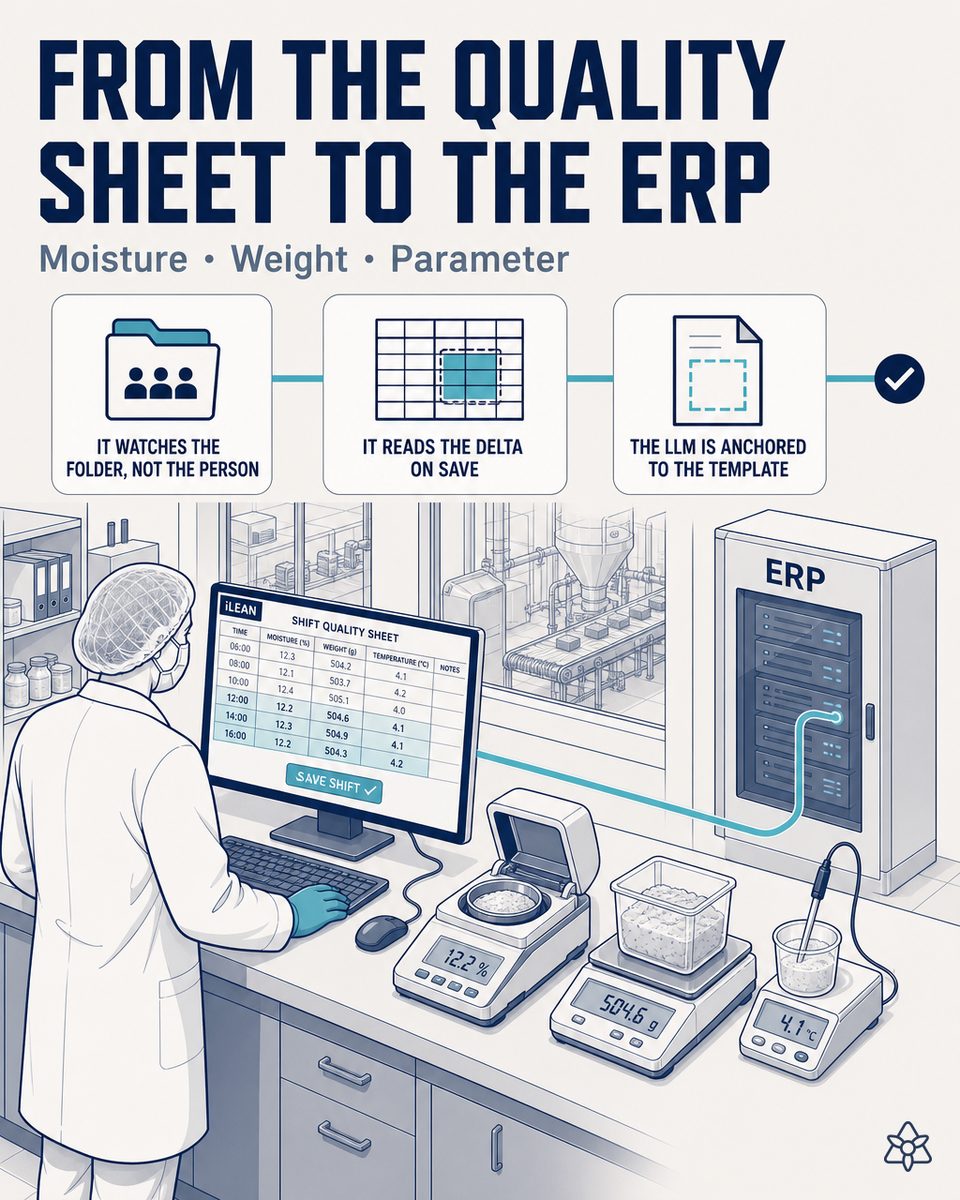
Two parallel worlds in the same plant — the real one (Excel) and the official one (ERP).
In plants that make food products there is a pattern that repeats with surprising consistency: quality control runs on a lab Excel, and the ERP runs on a transcription someone does at the end of the month.
- The lab's Excel is the REAL operating tool. The operator knows it, opens it fast, needs no training for it, customizes it with their own columns (moisture, weight, color, hardness, the acceptance range for each parameter), and saves the data in the shift's shared folder. It works.
- The ERP is the official system of record, but nobody opens it to enter quality data. It takes ten minutes per batch between starting the session, navigating to the module, filling in the fields, validating and closing. And it demands an extra license for every person who logs in. The lab does not use it.
- Result: two parallel worlds. The real one (Excel, where the shift's live data lives) and the official one (ERP, where the data is transcribed at month's end by a person who spends half a day copying and pasting). They coexist, but they are never the same data at the same time.
The hidden cost of this duality has four layers that pile up: (1) the person who transcribes — half a day of administrative work every month; (2) a lag of up to 30 days between the lab's real data and what the ERP sees, exactly when management asks for the dashboard; (3) the transcription errors that slip through — a misplaced decimal in moisture can change a batch's verdict; (4) when the IFS or BRC auditor arrives, there is no way to cross-check the Excel against the ERP because the cells do not match — the data is in both places but with different naming and misaligned dates, so it has to be rebuilt by hand.
iLEAN Connect does not replace the Excel — it connects it to the ERP without anyone noticing.
The problem is not the Excel. The problem is that the Excel and the ERP never talk, and forcing the lab to operate inside the ERP is expensive (in time and in licenses) without solving anything. iLEAN Connect, in "inward listening" mode, seals that crack: the Excel stays where it is, and the data flows to the ERP on its own.
Connect watches the lab's shared folder. When the quality manager saves the Excel, Connect reads the new cells, identifies them, deposits them in the central memory, and after one tap of human validation inserts them into the ERP automatically. The operator changes nothing. The ERP stops needing 5 lab licenses.
The concrete mechanics of Connect applied to the quality-control Excel at a food products plant:
- "Inward listening" mode — Connect watches the lab's shared folder where the shift's Excel lives. It does not watch the operator; it watches the file. When it detects a new save, it activates.
- Delta-only reading — Connect reads only the cells that have changed since the last save. It does not reprocess the whole Excel or the old data: only the new data for the batch in progress. This is what lets the system work in seconds, without saturating the network or the ERP.
- Parsing with an anchored LLM (no free generation) — the model identifies the column-and-row structure of the lab's Excel (sourdough moisture, average piece weight, bake color, hardness, batch, shift), without asking the operator to change a single column of their template. If the plant changes its Excel format, Connect re-maps. The operator never notices.
- iLEAN central memory instantly — the data crosses into the central memory the moment it is saved, not at month's end. This is what makes live dashboards possible, plus trend alerts (moisture climbing three shifts in a row) and real-time batch dossiers for the auditor.
- Human validation before the ERP — the data sits in a pending state until the quality manager validates it with one tap (on the earpiece, on the tablet, in the mobile app). Once validated, Connect inserts it into the ERP via API or RPC, depending on what the vendor supports.
- CRITICAL — savings on ERP licenses. Today the ERP demands a license per active user. If 5 lab people access the ERP just to enter quality data, that is 5 full licenses. With Connect, those 5 people stay on their Excel and the ERP receives the data automatically without anyone from the lab entering the system. Typical result: from 5 licenses down to 1 — the validating manager's, and even then that manager often validates from their phone without opening the ERP. The vendor's invoice changes.
Excel + manual transcription to the ERP vs. Excel + automatic Connect
| Aspect | Today — Excel + monthly transcription | With iLEAN Connect "inward listening" |
|---|---|---|
| Data worlds | Two parallel ones (real Excel / official ERP) | One — the operator's Excel, the ERP receives what is validated |
| Time spent transcribing | Half a day of work every month | Zero — Connect reads and pushes on its own |
| Lag between real data and ERP | Up to 30 days | Seconds — after human validation |
| Lab ERP licenses | 5 (one per person entering data) | 1 (only the validating manager) |
| Transcription errors | Inevitable — the miscopied decimal | Zero — the data is the same as in the original Excel |
| IFS/BRC auditor asks for Excel ↔ ERP cross-check | Manual reconstruction, days of work | Automatic per-batch dossier, same data on both sides |
| Changes to the lab's Excel template | Retraining, new procedure | Connect re-maps — the operator never notices |
Impact estimate for your plant — to be validated with your numbers.
The block below is an estimate to be validated with the specific data of your plant. We put it forward so the committee has an order of magnitude; we refine it during the diagnostic.
- Mid-sized food products plant, 2 shifts, quality control on a per-batch Excel in a shared folder, 4-6 lab people with ERP access exclusively to enter quality data.
- Connect pilot on the lab folder (no machine touched, no Excel touched, no ERP touched in the initial phase — just delta reading and deposit into central memory). First visible value within a few weeks.
- Estimated payback between 4 and 9 months, depending on how many Excels iLEAN absorbs (one per shift, one per line, one per SKU) and the volume of manual transcription avoided.
- Direct savings on ERP licenses: a typical 50-80% reduction in quality/lab module licenses, depending on how many users log into the ERP today just to transcribe. This lever alone can pay for the pilot in the first year.
- Recovery of half a day per month for every person who today spends time copying from Excel to the ERP — time that goes back to the lab, not cut from the org chart.
- IFS/BRC compliance reinforced: automatic Excel ↔ ERP cross-check per batch, dossier rebuildable with no manual work when the auditor arrives.
- The combined hard lever (licenses + time + zero transcription errors + audit) usually convinces the CFO before the quality manager — and that speeds up the decision.
And the quality manager's reasonable doubt
“What if the AI misreads a cell in the Excel and puts a wrong value into the ERP?” — hallucination is a problem of free generation, not of anchored tasks. In tasks where the AI merely recontextualizes a piece of data from one system to another (reading an Excel cell and mapping it to the equivalent ERP field), the best models brought error below 1.5% [1]. And even so, what is critical is never decided alone: iLEAN deposits the data as pending and the person signs before it crosses into the ERP. The three safety rings exist precisely for this.
[1] OpenAI paper “Why Language Models Hallucinate”, 2025 — on the reliability of AI in anchored tasks.
What people ask about capturing the quality Excel and pushing it to the ERP
Do I have to replace the lab's Excel with another tool?
No. The Excel stays exactly where it is and is filled in as always. iLEAN Connect watches the lab's shared folder and, when the quality manager saves the file, it reads only the new cells (not the old ones — just the delta since the last save). The operator does not change tools, gets no new training, keeps their template. The only thing that changes is that the data stops dying in the shared folder and starts reaching the ERP.
How does iLEAN tell quality data apart from operator notes?
Connect parses the Excel with an LLM anchored to the column-and-row structure — it does not generate free text; it identifies which cell corresponds to sourdough moisture, which to average piece weight, which to bake color, which to hardness. Notes in free cells (“Oven 2 ran slower today”) are tagged as operator comments and are not injected into the ERP as structured data — they stay attached to the batch as a note, accessible if anyone needs them but without contaminating the numeric fields.
What about the old data already sitting in legacy Excels?
Connect can do an initial pass over the historical files — the Excels from the last months or years — and push them to the ERP as a one-time historical load. From then on it works on the delta: only what is new. The historical load is optional and is usually decided based on what it will be used for (retroactive IFS/BRC audits, quality trend analysis, predictive defect modeling). The system does not break if you decide to load nothing old and start clean.
Who validates that the Excel data is correct before it goes to the ERP?
The quality manager. Connect absorbs the data from the Excel, deposits it in the iLEAN central memory and it sits in a pending validation state. The manager receives an alert through whichever channel they use (earpiece, tablet, mobile app) with the batch's data, and one tap (a spoken “OK” or a press) releases it to the ERP. If they spot something odd — a moisture reading out of range, a weight that does not fit — they block and correct it before it is sent. The person signs — never the other way around.
Does this really reduce the ERP licenses I pay for?
Yes, and it is one of the hard levers of the payback. Modern ERPs (SAP, Microsoft Dynamics, Sage, Odoo in its commercial edition) bill per named active user. If today 5 lab people log into the ERP solely to enter quality data they already had in Excel, that is 5 full licenses. With Connect, those 5 people keep working in their usual Excel and the ERP receives the validated data without anyone from the lab touching the system. Typical observed result: a 50-80% reduction in quality/lab module licenses. The exact figures depend on your contract with the ERP vendor.
More cases in food
- Coder and labeler integrated with iLEAN — the operator stops typing the SKU changeover.iLEAN Connect integrates directly with Markem-Imaje, Domino or Videojet. Batch, date and allergens…
- In-line human verification tablet — the person signs, in 2 taps, before the data enters the system.iLEAN Connect puts a tablet at the line so the operator confirms in seconds what the AI just captured —…
- A 1998 tunnel oven with an isolated Windows 2000 PC — and a per-batch baking dossier the IFS auditor wants tomorrow.iLEAN Connect captures the analog panel or isolated legacy PC of your industrial tunnel oven without…
- The supplier's email at 8:14 can't wait for the purchasing manager's first free slot.iLEAN Connect reads the raw material supplier's email at second zero. If it flags a delay, production…
- The section lead can't be in five places at once — his AI earpiece can.The section lead talks to iLEAN without breaking stride on the production line. It listens, logs what…
- A paper delivery note should not block the unloading of the truck.A photo of the delivery note and the batch labels, validated in seconds and pushed to the ERP. Raw…
Tell us your case and in 48h we'll send you the estimated ROI of capturing your quality Excel and pushing it to the ERP.
We work on your plant's real data, not ours. Diagnostic with no commitment.
Request estimated ROI in 48h ‹ All food product cases See food industry