The coder and labeler integrated with iLEAN — the operator stops typing the SKU change.
Your coder and labeler already have a modern Ethernet/OPC interface, but the operator still types every SKU change by hand. iLEAN Connect integrated mode joins them to the ERP/MES: the batch, the date, the allergens and the code travel automatically from the production order to the first printed package. No typing, no transcription error.
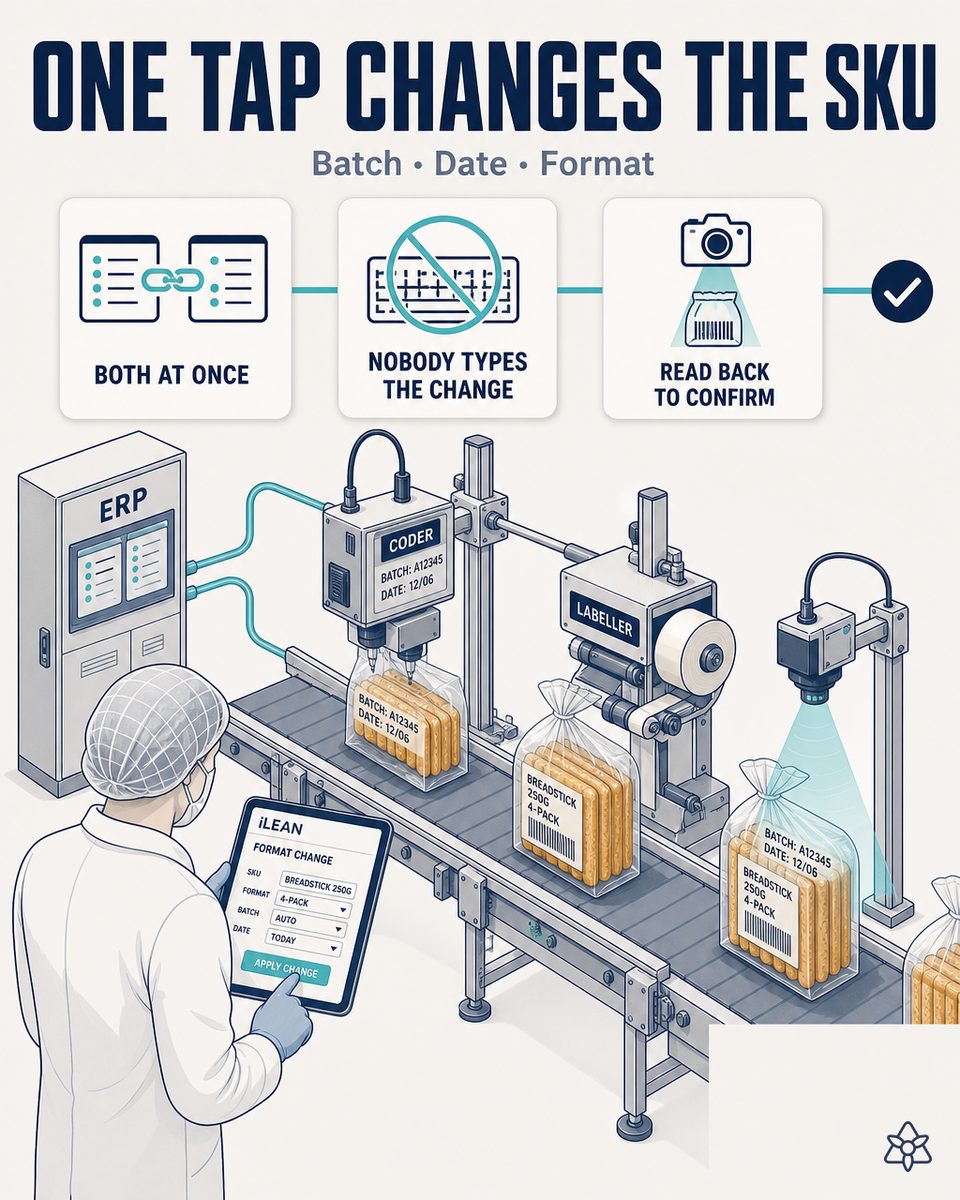
The modern coder is already on the line — but disconnected from the ERP.
It happens in a great many breadstick and crispbread factories: the investment in the Markem-Imaje, Domino or Videojet coder is already made. The machine has an Ethernet port, speaks OPC UA, exposes a REST API. And still, at every SKU change, the operator climbs onto the line, opens the coder's panel and types by hand the new batch, the new date, the new expiry, the new SKU's allergens.
- One wrong digit in the batch — the operator types 251207 when it was 251208, and 1,200 bags print with a batch that does not exist in the ERP. Traceability broken.
- An incorrect expiry — the previous SKU's shelf life (90 days) is applied to the new SKU (60 days, because it carries seeds and oil). Product on the shelf with an impossible date.
- The previous SKU's allergens — the line switches from classic to sesame breadsticks and the label still declares "sesame-free". A recall.
- The previous batch's label reused — the new SKU's first box goes out with the previous one's label because nobody validated the first print.
The production manager knows it, and keeps an SKU-change checklist pinned to the wall. The checklist works 99% of the time. That 1% is what reaches RASFF — and one wrong digit in the date is a recall, not an incident.
iLEAN Connect integrated mode — the coder and labeler become just another ERP peripheral.
The modern coder does not need an operator to type into it: it needs a layer that speaks the ERP's language to it. iLEAN Connect in integrated mode is that layer. It is the putty covering the dead zone between the ERP's production order and the job the coder prints — without asking you to change the coder, the labeler or the ERP.
The order changes in the ERP. Connect translates. The coder prints the correct SKU from the first bag. The operator signs — they do not type.
How the iLEAN pieces are laid out in a breadstick and crispbread factory with a modern coder/labeler:
- Connect (integrated mode) — talks to the coder over its native interface: OPC UA with Markem-Imaje series 9, Ethernet/IP with Domino Ax-Series, REST/MQTT with Videojet 1860, IO-Link for peripheral actuators. On the other end it reads the ERP's production order (SAP B1, Sage, A3, Navision, Odoo, Datisa) and the SKU's template. It translates and loads the job in milliseconds. The coder stops having a panel to touch.
- Agent — governs the SKU change as a process, not a keyboard. When the order changes, the agent: validates that the format is approved for that SKU, recalculates the expiry per the defined shelf life, verifies that the recipe's allergens match those declared on the label template, holds the first print for visual validation and, if everything adds up, releases the line. If something does not, it holds and alerts the quality manager through whichever channel they use. The person signs — the line does not start on its own.
- Edge (optional, recommended) — a terminal with machine vision over the coder's exit that reads the first printed bag and compares what printed against what was expected. If the modern coder already carries its own vision camera, Connect connects to it; if not, an Edge is mounted. It closes the cycle: the guarantee that what leaves the head matches the order.
A hand-typed SKU change vs. an SKU change triggered by the order
| Aspect | A coder typed by hand | With iLEAN Connect integrated mode |
|---|---|---|
| The SKU change's trigger | The operator reads the order and types at the panel | The ERP's order triggers the job automatically |
| SKU change time | 5-12 minutes per change (climb, type, verify, climb down) | Seconds — the line stops only for the physical format change |
| Batch transcription error | Inherent to manual typing | Removed — the data travels hands-free |
| The expiry | The operator calculates or types the date | Calculated by the SKU's template per shelf life |
| Allergens on the label | A generic template updated "when there is time" | Synchronized with the active SKU's recipe in the ERP |
| First label validation | The operator's glance, no record | Vision on the first bag + the manager's signature |
| The file for the IFS/BRC auditor | Rebuilt by hand, weeks | A per-batch dossier, automatic, with the first bag's photo |
| A reel label format change | The designer edits and resends to the line lead | A per-SKU template, triggered by the order |
Impact estimate for your plant — to be validated with your own numbers.
The block below is an estimate to be validated against your plant's actual data. We put it forward so the committee has an order of magnitude; we refine it during the assessment.
- Breadstick and crispbread factory with 2-4 packing lines, a modern thermal coder (Markem-Imaje series 9 / Domino Ax / Videojet 1860) and/or a reel labeler, 15-30 active rotating SKUs.
- Connect integrated mode deployment on one pilot line. First value expected within a few weeks: the SKU change goes from typing to a job triggered by the order.
- A reduction in SKU change time in the order of ≥ 50% (the stretch eliminated by climbing to the panel and typing).
- Coding errors (batch, date, allergen) trending to zero on the transcription side — the residual remains only in errors in the order itself, caught at the first-label validation.
- Indicative payback between 4 and 9 months, depending on monthly SKU change frequency, the average cost of a stopped line minute and the historical exposure to labeling recalls.
- The hard lever, as in the other food landings, is a single recall avoided: product recovered from the shelf, reverse transport, destruction, brand damage. One recall pays for the pilot.
And the fair question from the production lead
"What if Connect errs translating the order into a coder job, and the line prints wrong at production speed?" — a fair question. Two complementary answers. First, technical: Connect in integrated mode does not "interpret" the order, it recontextualizes it from one format to another. Hallucination is a problem of free generation, not of anchored tasks; in tasks where the AI limits itself to moving a data point from one system to another (the ERP's order into the coder's "batch" field), the best models brought the error below 1.5% [1]. Second, architectural: the first bag of every SKU is validated with vision and the manager's signature before releasing the line. The three safety rings are there precisely for this — the person signs the critical.
[1] OpenAI paper "Why Language Models Hallucinate", 2025 — on the reliability of AI in anchored tasks.
What people ask about the Connect integration with the coder and labeler
Which coder brands does iLEAN integrate with?
iLEAN Connect integrated mode links with the latest-generation coders and labelers of the main manufacturers — Markem-Imaje, Domino, Videojet, Linx, Hitachi — using the interface the equipment exposes: Ethernet/IP, OPC UA, REST, MQTT or IO-Link depending on brand and model. Connect's rule (Part B.2 of the architecture): if the machine has a modern interface, direct integration; if it has an old local computer, intermediate capture; and if it is analog, manual capture with phone/earpiece. We do not force you to change the coder.
Do I need a MES or is an ERP alone enough?
An ERP alone is enough — and it is usually the common scenario in SME-type breadstick and crispbread factories. iLEAN Connect reads the ERP's production order (SAP Business One, Sage, A3, Navision, Odoo, Datisa, whichever you have) and translates it into the format the coder understands. If you also have a MES, better: we enrich the data with the packing plan and the intermediate cleaning between SKUs. But it is not a prerequisite — the ERP alone already removes the manual typing.
Does it also work with reel labelers?
Yes. The integration applies equally to a reel labeler (self-adhesive on flow-pack or on a carton) and to a thermal coder printing directly on the film or the cardboard. What changes is the format of the job sent to the machine — a full label design with TrueType and an EAN-13/GS1-128 barcode for the labeler, versus variable fields (batch+date+L+time) for the thermal coder. iLEAN Connect keeps one template per SKU and per machine, and triggers it per the active line.
How is the SKU change managed?
The SKU change is triggered by the ERP's production order, not by the operator typing at the panel. When the order switches reference (from classic crispbread to garlic breadsticks, for example), Connect loads the new job into the coder — batch, packing date, expiry calculated per the SKU's shelf life, declared allergens, EAN, the raw material batch if you need it for traceability. The operator sees on screen what is about to print and signs with one tap. The line does not start until that signature.
Validation of the first label?
Yes, and it is where Connect closes with an optional Edge or with the modern coder's own vision camera. The first unit printed after an SKU change is physically held, read with vision, its fields compared with what should have printed, and only if it matches is the line released. If it does not match, the system holds and alerts — the person validates and signs. This closes the SKU change's classic hole: the first box with the previous SKU's label that can no longer be recovered from the shelf.
More cases from this series
- The supplier's email at 8:14 cannot wait for the purchasing manager's first free moment.iLEAN Connect reads the flour supplier's email at second zero. If it warns of a delay, planning is…
- The lab's Excel is not the problem — it is that nobody on the ERP sees it.iLEAN Connect detects the breadstick line's quality control Excel, absorbs it in real time and, after…
- A human verification tablet on the line — the person signs, in 2 taps, before the data enters the system.iLEAN Connect puts a tablet on the breadstick line so the operator confirms in seconds what the AI has…
- Batch startup in a breadstick and crispbread snack factory — the first label is where the shift is at stake.Connect captures by photo the production order and the batch's first label in a breadstick plant, and…
- The section lead cannot be in five places at once — their AI earpiece can.The section lead talks to iLEAN without breaking stride along the breadstick line. It listens, records…
- The paper delivery note should not block the truck's unloading.A photo of the delivery note and the flour batch labels, validated in seconds and pushed to the ERP.…
Tell us your case and we will send within 48h the estimated ROI of this AI project for your breadstick and crispbread factory.
We work on your plant's real data, not ours. Assessment with no commitment.
Request estimated ROI within 48h ‹ See all 13 breadstick and crispbread cases See food industry