The coil marker stitched to the active order, with no retyping
The coil tag carries heat, grade standard, gauge, weight and destination customer. The marker is usually modern and has an API — but it sits isolated, and manual typing is still the standard method at every heat change. With iLEAN Connect it is stitched to the ERP and the MES: the data travels from the systems to the coil with no typing in between. Pure poka-yoke.
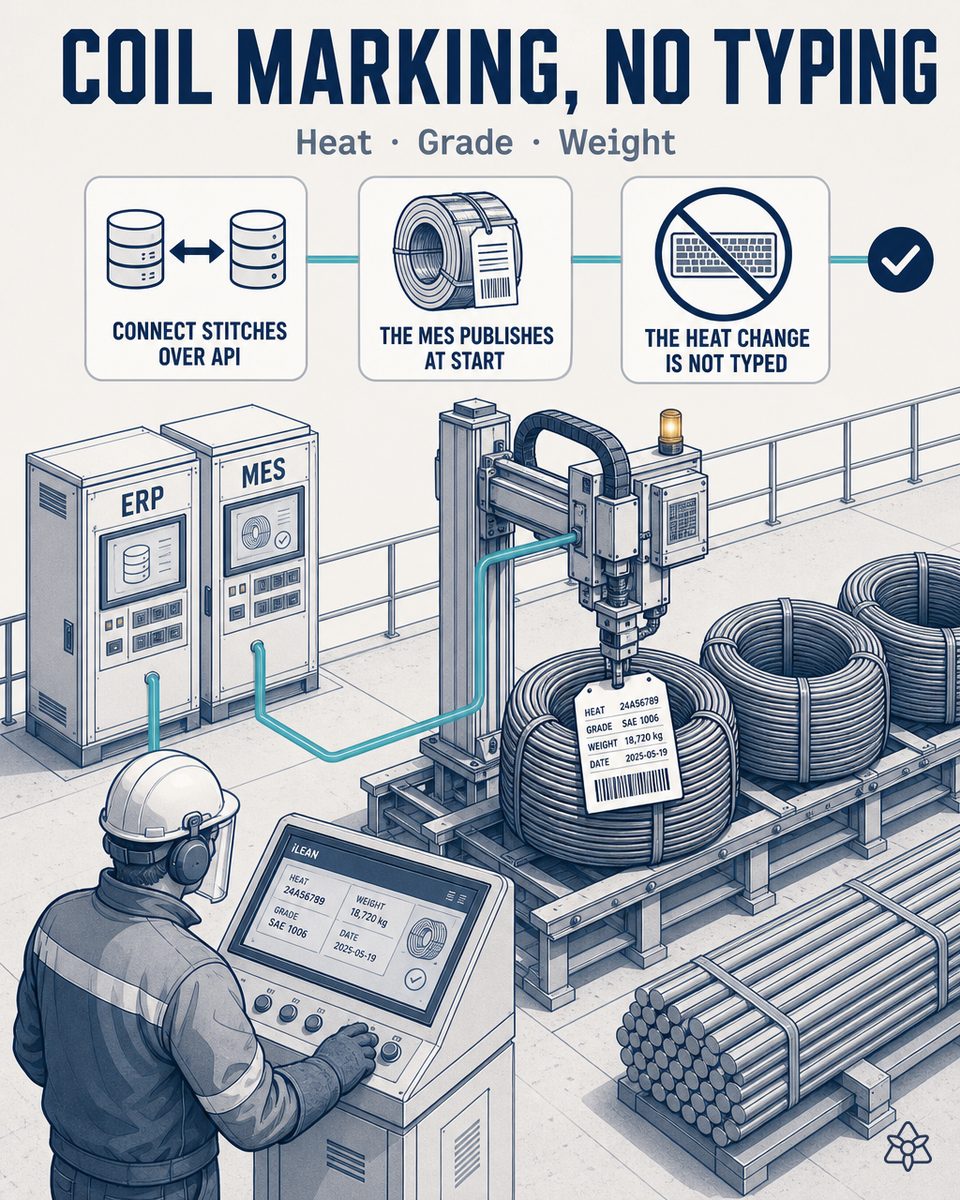
The marker has an API — but the heat is still typed by hand at every change.
In a long steel plant, the coil tag is the identity document of the material: heat, grade standard, gauge, weight and destination customer. All of that already lives in the ERP and the MES — and yet, at every heat change, somebody translates it by hand on the marker panel, because the equipment, modern and API-equipped as it is, sits isolated from both systems:
- Manual typing at every heat change — when the new heat comes in, somebody types the heat number into the marker panel, checks the grade standard and the gauge and adjusts the destination customer tag. One panel, several opportunities for error, no cross-check against the ERP or the MES.
- One wrong digit is half a production run compromised — a wrong heat digit turns half the run into wrongly tagged coils: stock confusion for weeks and, in the worst case, a claim from an automotive Tier 1 and an IATF non-conformity. Estimate to be validated against your plant's data, but that is the order of magnitude.
- The material certifies by heat — the coil's quality certificate hangs from the heat number: if the tag does not match the real material, the traceability chain breaks exactly at the link the customer audits first.
The ERP knows which order and which destination customer apply; the MES knows which heat is running on the mill. But neither of them tells the marker: somebody has to translate it by hand, with the bundle waiting and the risk of a claim on the table.
Connect stitches the MES, the ERP and the marker over API — the heat change stops being typing and becomes an MES event.
The heat change needs no more screens and no more transcriptions: it needs the data that already lives in the MES and the ERP to reach the marker at exactly the right moment, without anyone rewriting it. That is what Connect is for.
When the MES marks a coil or bundle start, it automatically publishes heat, grade standard, gauge and weight to the marker. And the marker does not print if the ERP and the MES do not agree.
How Connect works on the marking line of a long steel mill:
- Connect stitches modern systems over API — the marker already has a modern interface, whether a Domino, Videojet, Markem-Imaje or industrial Zebra type; Connect connects to it, to the MES and to the ERP without touching the mill PLC or replacing any equipment.
- The MES publishes at coil or bundle start — heat, grade standard, gauge and weight reach the marker at the very instant the MES marks the start, in a single transaction.
- The heat change stops being typing — it becomes an MES event: when the MES records the new heat, Connect publishes it; nobody writes it into the marker panel again.
- ERP ↔ MES interlock before printing — Connect cross-checks what the MES declares against the ERP order; if a single field differs, the marker does not print: it holds and alerts the person with the exact field that does not match.
- The customer tag travels with the order — grade standard, gauge and the destination customer's tag template are tied to the order in the ERP; switching between customers stops depending on navigating panel menus.
- A record of the change for the auditor — what was published, at what time, to which device and with what confirmation is filed automatically, with nobody reconstructing it for the customer audit.
Heat typed into the panel vs. heat published from the MES
| Aspect | Isolated marker, manual typing | With iLEAN Connect |
|---|---|---|
| Heat change on the marker | Typed by hand into the panel at every heat | An MES event — published automatically |
| Typing errors in heat, standard or gauge | 2-3 a month, some with a claim or stock confusion attached | Zero human-origin errors in coil marking |
| Stock confusion from a wrong tag | Weeks to detect and clean up | Eliminated at source — the tag comes from the MES data |
| ERP ↔ MES ↔ tag consistency | Nobody checks it before printing | The marker does not print if the two systems do not agree |
| Risk of a Tier 1 claim and IATF non-conformity | Latent at every heat change | The human-origin error that triggers it is eliminated |
| Record of the change for the auditor | Reconstructed afterwards across systems | Filed automatically: what, when and with what confirmation |
Impact estimate for your plant — to be validated with your own numbers.
The block below is an estimate to be validated against your plant's actual data. We put it forward so the committee has an order of magnitude; we refine it during the assessment.
- Long steel plant with a relatively modern API-equipped coil marker and several heat changes per shift, serving several customers and grade standards.
- Connect pilot on the heat change — it stitches the marker to the ERP and the MES over API, without replacing equipment or touching the mill PLC. First value expected within a few weeks.
- Fast payback estimated at 3 to 6 months, depending on the frequency of heat changes per shift and the cost of each stock confusion. Estimate to be validated.
- The hard lever is the drastic reduction in the risk of a wrong-tag claim and of stock confusion: a single mislabeled coil at an automotive Tier 1 can cost, between containment, sorting and an IATF non-conformity, far more than the whole pilot. This poka-yoke is also the natural foundation of the flagship's fourth ring against per-heat deviation. Estimate to be validated.
And the fair question from the quality manager
"What if the AI invents a heat or a gauge?" — it cannot: in this case the AI generates no data, it carries it anchored. The heat, the grade standard, the gauge and the weight come straight from the MES and the ERP order; hallucination is a problem of free generation, not of anchored tasks, where the best models brought the error below 1.5% [1]. And even then, the critical call is not made alone: Connect cross-checks the ERP and the MES before publishing, reads back what the marker confirms it applied and holds the print if anything differs, alerting the person before the first tag comes out. The safety rings exist precisely for this.
[1] OpenAI paper "Why Language Models Hallucinate", 2025 — on the reliability of AI in anchored tasks.
What people ask about stitching the coil marker to the ERP and the MES
What protocols or APIs does the integration between the coil marker, the MES and the ERP use?
Connect connects to the marker over REST API or OPC-UA, depending on what the device exposes — modern industrial markers of the Domino, Videojet, Markem-Imaje or industrial Zebra type already carry one of the two. On the MES and ERP side, Connect integrates over REST API or webhook on production events — coil start, bundle start, heat change — without touching the database directly or the mill PLC. There are no intermediate files and no manual exports: when the MES marks the start, the heat, the grade standard, the gauge and the weight are published to the marker in a single transaction, event by event.
What happens if the marker loses its connection in the middle of a bundle?
The mill does not stop: the marker keeps printing with the heat, the standard and the gauge it already has applied and confirmed, because the data was published complete at the bundle start. What Connect does is hold the next change: if the connection is unavailable when the bundle closes or the next one starts, it does not let it start on half-published data and alerts the line manager with a short message. As an emergency exit the usual manual mode still exists — typing on the panel as today — but with the validated figure printed from the MES, not from memory. Connect adds no single point of failure: it steps aside without blocking the line.
How does the "the marker does not print if the ERP and the MES do not agree" interlock work?
Before publishing anything, Connect cross-checks the two sources: the heat, the standard and the gauge the MES declares for the coil in progress against what the order or production order says in the ERP — destination customer included. If the two versions agree, it publishes the package to the marker and releases the print; if they differ in a single field, it holds the marking and alerts the person, indicating the exact field that does not match. On top of that, the marker confirms back which data it applied and Connect compares it against what was published before the start counts as good. It is a data interlock, not a machine interlock: nobody loses control of the equipment, but no tag leaves with a heat the two systems do not back.
How is a multi-standard, multi-customer line managed?
The grade standard and the tag format travel tied to the order in the ERP: each coil carries with it which standard applies, which gauge, which fields the destination customer requires and which tag template corresponds to it. At coil or bundle start, Connect publishes that complete package and the marker loads the right template without anyone selecting it by hand on the panel. Switching from one customer to another — or from one standard to another within the same shift — stops being menu navigation on the marker: the order itself dictates the tag, which is exactly where a coil tagged with the previous order's standard slips through today.
Does this replace the mill operator or free them up?
It does not replace them: it removes the typing of the heat, the standard and the gauge on the panel at every change, which is the mechanical, error-prone part of the job — and the one that can end in stock confusion or a claim from an automotive Tier 1. The heat change goes from typing on the marker to an event that already exists in the MES. The recovered time returns to what does require human judgment: reviewing the first printed tag, checking the strapping and the real start of the bundle, and supervising the mill itself.
More cases from this series
- Every heat ships with its audit dossier already madeEvery heat ships with its auditable dossier: charge mix, chemistry, rolling record and certificates,…
- The customer alert, read within seconds instead of hoursOrder changes, quality alerts and scrap supply delays are read, classified and cross-checked against the…
- The electric arc furnace panel already talks — without touching its PLCA camera reads the electric arc furnace panel and every heat carries its real energy and power-on curve…
- Heat startup in the melt shop, digitized with a photographThe heat startup sheet is photographed and the heat exists in the central system at zero latency: scrap…
- The lab spreadsheet poured into the ERP, without retypingChemistry and mechanical readings move from the lab spreadsheet into the ERP with no retyping — and…
- Scrap receiving enters the ERP with a photo, not with typed linesA photo of the weighbridge ticket and the load classification puts grade, weight and radiological check…
Close the marking poka-yoke on your line — kick-off in 2 weeks.
We work on your plant's real data, not ours. Assessment with no commitment.
Request estimated ROI within 48h ‹ See all 12 long steel cases See steel