Batch startup at a food products plant — the first label is where the shift is won or lost.
In a food products plant, the most critical moment is batch startup: the production order on paper, the first printed label, and the operator cross-checking them by hand. iLEAN Connect captures both by photo, digitizes them on the spot and guides the operator through the critical checks before the line releases the first pack.
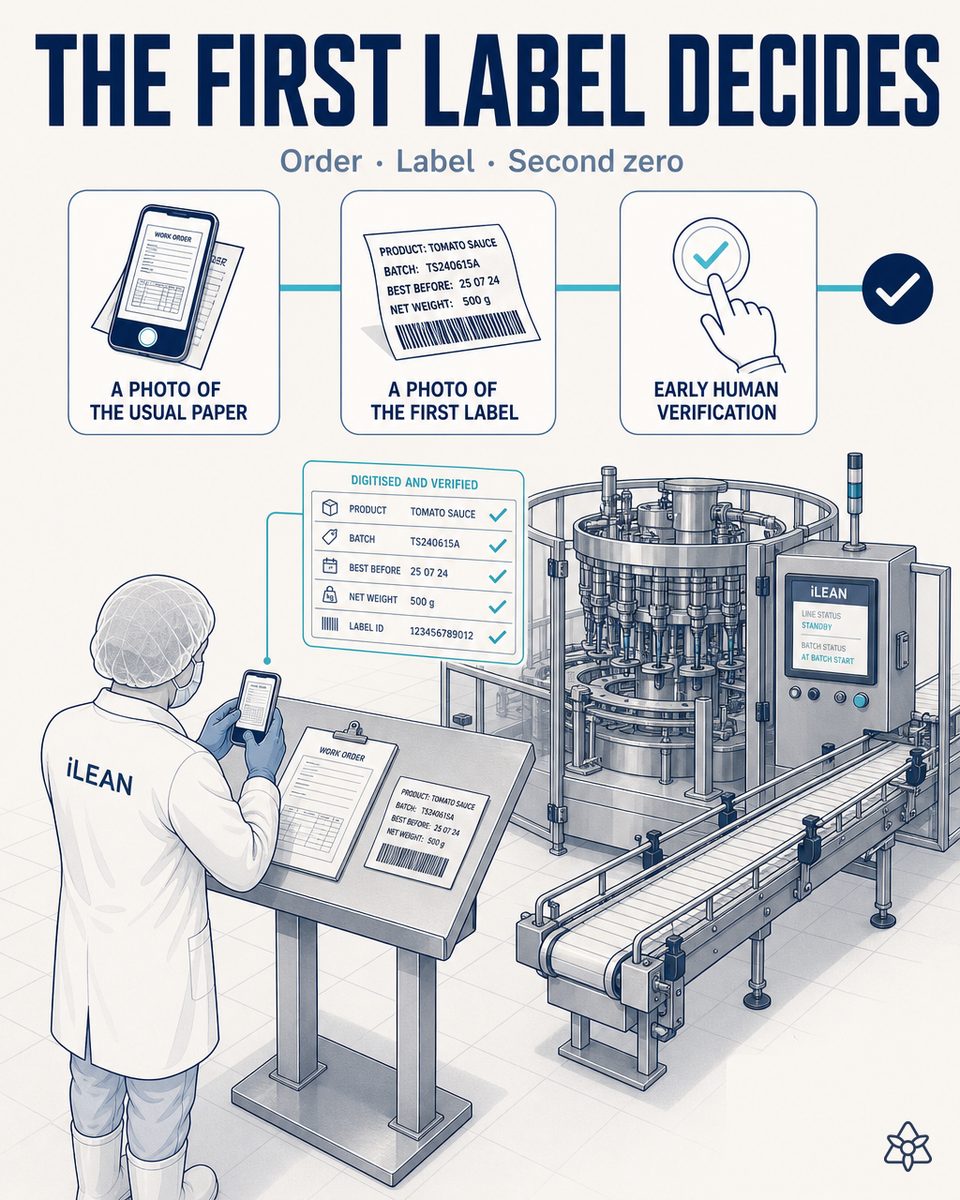
Batch startup is where the chain breaks — not steady-state production.
In a multi-SKU food products plant, the line at steady state is stable: once it starts, pack after pack comes out with few incidents. The problem is the SKU changeover, which happens several times per shift and concentrates three changes at once:
- Label reel — the ingredient declaration, allergens and format change. The previous batch's label should never appear on the new one.
- Date code — expiry date recalculated for that SKU, following whichever retailer rule applies (different weeks for private label vs. own brand).
- Seasoning recipe — sesame, cumin, whole wheat, no salt, tomato. The silo and the doser change; the intermediate cleaning should be recorded before starting.
The production order arrives on paper from the office (sometimes late, sometimes with a change scribbled on top in pen). The operator reads it, cross-checks it mentally against the first label out of the printer, and decides whether to start or call the shift lead. It is the natural bottleneck of the shift: decide right and nothing happens; decide wrong and the brand can end up in a recall for mislabeling. And they almost always do it alone, by the light of the control panel, with the line stopped and waiting.
Connect in manual mode — the operator's phone digitizes the paper and the pack, without touching the line.
Batch startup does not need a new screen on the line or a modified PLC. It needs the information that already exists on paper (the office production order) and the information that already comes out printed (the first label) to reach the system at second zero, without retyping it and without depending on the operator's memory. That is what Connect in manual mode is for.
The operator photographs the paper production order. Connect digitizes it by OCR. They photograph the first label. Connect reads it and cross-checks it against the expected recipe. If something is off, it alerts at that very moment. The person signs — the line does not restart on its own.
How manual Connect operates at food product batch startup:
- Photo of the paper production order — the operator or shift lead photographs the production order that came down from the office with their phone or tablet. Connect digitizes the SKU, the expected recipe, the quantity, the customer and the expiry date to apply. In seconds, the order is in the system without anyone typing it in.
- Photo of the first printed label — before releasing the first pack, the operator photographs the first label out of the printer. Connect reads the ingredients, the declared allergens, the batch code and the printed expiry date by OCR.
- Cross-check against the plant recipe wherever it lives — Connect cross-references the digitized production order and the label with the silo recipe, wherever it lives: a modern ERP, a vertical bakery MES or the Excel file the R&D manager keeps in a shared folder. Nothing needs migrating; it connects where the data is.
- Alert in the earpiece — if the current batch's label declares “no tree nuts” but the previous batch's seasoning contained almond and the intermediate cleaning is not recorded as complete, Connect alerts the operator instantly with a short phrase: “careful — this label declares no tree nuts, but the cleaning after the almond batch is not recorded as closed.” The person validates or calls the shift lead; the line does not start on its own.
- Startup file saved — the photo of the production order, the photo of the first label and the recipe cross-check are archived per batch. When the IFS/BRC auditor asks for the startup file from February 14, there is nothing to reconstruct: it is right there.
Eyeball manual startup vs. digitized startup with Connect
| Aspect | Classic startup by the light of the panel | With iLEAN Connect in manual mode |
|---|---|---|
| Production order | On paper, read by hand, sometimes with pen edits on top | Phone photo — digitized by OCR in seconds |
| First label of the batch | Cross-checked from memory against the order, operator's call | Phone photo — cross-checked against recipe and order at second zero |
| SKU changeover on the line | 20-25 min with three paper checklists | 4-6 min with two photos and an alert if something deviates |
| Seasoning / silo recipe | R&D Excel that does not always reach packing | Connect reads it wherever it lives — ERP, MES or the Excel itself |
| Incident alert | The operator goes off to find the shift lead | Instant alert in the earpiece or phone — one short phrase |
| File for the IFS/BRC auditor | Rebuild the startup by hand, weeks later | Photo + cross-check archived per batch, automatically |
Impact estimate for your plant — to be validated with your numbers.
The block below is an estimate to be validated with the specific data of your plant. We put it forward so the committee has an order of magnitude; we refine it during the diagnostic.
- Food products plant: 1-2 packing lines, 6-10 SKUs per shift, reel and recipe changes several times a day.
- Manual Connect pilot on batch startup — just the operator's phone/tablet, no construction work on the line. First value expected within a few weeks.
- Indicative payback between 4 and 9 months, depending on the frequency of documented startup incidents (wrong label, misapplied expiry date, crossed seasoning) and the average cost of a recall or rework at your retailer.
- Expected reduction in startup incidents of ≥30% in the first three months, from simple automatic cross-checking at second zero. Estimate to be validated with your data.
- The hard lever is a single avoided recall: product pulled from the shelf, reverse logistics, destruction, brand damage. One recall pays for the pilot.
And the production manager's reasonable doubt
“What if the OCR misreads the label and lets a batch through with the wrong declaration?” — hallucination is a problem of free generation, not of anchored tasks. In tasks where the AI merely recontextualizes a specific piece of data from one medium to another (reading the printed label and comparing it with the expected recipe), the best models brought error below 1.5% [1]. And even so, what is critical is never decided alone: Connect holds the startup and the person signs. The three safety rings exist precisely for this.
[1] OpenAI paper “Why Language Models Hallucinate”, 2025 — on the reliability of AI in anchored tasks.
What people ask about batch startup in food products
Why does batch startup fail in a food plant?
Because startup concentrates three changes at once in a few minutes: a new label reel (with its ingredient and allergen declaration), an expiry date code recalculated for that SKU, and a seasoning recipe (sesame, cumin, no salt, whole wheat, tomato) going into the mixer. The production order usually arrives on paper from the office, and the operator cross-checks it by hand against the printed label and against the silo recipe — all of it in a few minutes, with the line stopped and waiting to start. It is the natural bottleneck of the shift and the moment where most errors appear.
Do I have to install a new screen on the line?
No. Connect in manual mode works with the phone or tablet the operator or shift lead already carries. Take a photo of the paper production order, take a photo of the first label out of the printer, and Connect digitizes both by OCR/vision in seconds. There is nothing to wire, no new industrial screens to mount, no need to replace the label printer you already have. If later on you want Edge over the line for continuous verification, it can be added — but manual startup already covers 80% of the first-pack risk.
Does the operator have to learn an app?
The interaction is deliberately minimal: one photo of the production order, one photo of the label, then reading the confirmation or the warning on the phone or in the earpiece. There are no menus, no checklists to fill in, no fields to type. The real learning curve on the floor is one shift — because the gesture (taking a photo with a phone) is one everyone has already learned. If Connect detects a deviation, it does not send an email: it alerts the operator at that very moment, in one short phrase, in the shift's language.
What about old machines with no screen?
That is exactly the scenario where manual Connect shines. In food products plants with 15-20 year old lines, the label printer, the mixer and the oven rarely have a touchscreen or a modern industrial protocol. Connect does not connect to the machine — it connects to the paper and the pack. A photo of the paper production order, a photo of the first printed label, and the system cross-checks against the silo recipe wherever it lives (ERP, vertical MES or the Excel file R&D maintains). No PLC touched, no line stoppage for integration.
How is the first label of each SKU validated?
The operator photographs the first label out of the printer before releasing the line. Connect reads the ingredient list, the declared allergens, the batch, the expiry date and the SKU code by OCR. It cross-checks them at second zero against the digitized production order and the expected recipe: if the label declares “sesame-free” but the previous batch's seasoning contained sesame and the cleaning is not recorded as complete, Connect holds and alerts. The person validates and signs — the line does not start on its own. The startup file is saved with the photo, and no one has to reconstruct it later for the IFS/BRC auditor.
More cases in food
- FSMA for food exports to the US — seven rules, one single file, 24 hours to hand it over.iLEAN covers all seven FSMA pillars: traceability, preventive controls, food defense, importer rule. One…
- Functional ingredient quality — viability is won or lost over weeks.iLEAN safeguards probiotic and prebiotic viability from goods-in through to the final packing of the…
- Industrial AI for Functional Food Ingredients PlantsReal-world iLEAN industrial AI use cases for functional food ingredients plants: Connect, Edge and…
- Coder and labeler integrated with iLEAN — the operator stops typing the SKU changeover.iLEAN Connect integrates directly with Markem-Imaje, Domino or Videojet. Batch, date and allergens…
- In-line human verification tablet — the person signs, in 2 taps, before the data enters the system.iLEAN Connect puts a tablet at the line so the operator confirms in seconds what the AI just captured —…
- A 1998 tunnel oven with an isolated Windows 2000 PC — and a per-batch baking dossier the IFS auditor wants tomorrow.iLEAN Connect captures the analog panel or isolated legacy PC of your industrial tunnel oven without…
Tell us your case and in 48h we'll send you the estimated ROI of this AI project for batch startup at your food products plant.
We work on your plant's real data, not ours. Diagnostic with no commitment.
Request estimated ROI in 48h ‹ All food product cases See food industry